

Registering for the Udmurt State University INGENIUM Olympiad — for master's admission
This guide takes you from the olympiad's page on ATHAR to its page on the Sodruzhestvo platform, then through the participant form field by field, with what to prepare before you send it.
Screens and dates can change; check the platform page before each step.
Contents
- Who can take part?p. 3
- Documents to prepare firstp. 4
- Part 1 — From ATHAR to the olympiad page (steps 1–5)p. 5
- Part 2 — The olympiad on the platform (steps 6–8)p. 9
- Part 3 — The participant form (steps 9–14)p. 12
- Part 4 — Sending and after: status, document upload (steps 15–16)p. 17
- The 13 document tasksp. 20
- How to prepare for the interview (tips)p. 23
- Final checklist and help linksp. 24
How to read this guide
Each step carries a tag showing where it comes from:
- Tried we opened it on ATHAR or the platform on 5–6 November 2026.
- Official source published on the olympiad page or shown by the platform, but not carried through.
- Not verified not available yet, or not found in an official source.
Each step has a screenshot with numbered gold boxes, explained below it. Personal data in the images is permanently removed from the pixels.
For this guide we sent the form from one participant's account and opened the document tasks without sending any file. We haven't tried the test or the interview; see Part 4.
Who can take part?
| Question | What the current cycle's platform page says | Tag |
|---|---|---|
| Level | For master's admission only: “international students and university graduates enrolled in bachelor's and specialist degree programs” | Official source |
| Age | “Age limit: 30 years (inclusive)” | Official source |
| Not graduated yet | A transcript is accepted instead of the diploma “if the degree is to be completed in the year the Olympiad is held” | Official source |
| Which year is “the olympiad year”? | The cycle runs from November 2026 to February 2027; the sources we checked don't say whether this means 2026 or 2027 | Not verified |
| Test language | The form offers three options: Russian, English and French | Tried |
The condition is quoted as published. How it applies to you (especially your graduation year and the type of your degree) is a question for the organiser: [email protected].
The platform may accept the form before anyone reviews it. Receipt is not acceptance, and it doesn't prove your documents are complete.
- Now
- Make sure the level and graduation-year conditions apply to you before you start.
Documents to prepare first
This is the portfolio list as published on the platform. The form itself only asks for the personal-data consent (step 13); the other files go into separate tasks after you send the form (p. 20).
| Document | Notes | Tag |
|---|---|---|
| International passport | A clear data page | Official source |
| Notarised translation of the passport | If it has no information in Russian | Official source |
| Diploma with supplement, or a transcript | The transcript only if you complete your studies in the olympiad year | Official source |
| Notarised translation of the diploma and supplement, or of the transcript | If they have no information in Russian | Official source |
| Motivation letter | Write it yourself, honestly | Official source |
| List of publications with working links | If any | Official source |
| Certificates for events | Sports, academic, creative or volunteer; and UdSU events, if any | Official source |
| Consent to the processing of personal data | A template you download from the form, sign and upload | Tried |
Neither the platform page nor the tasks give file size or format limits. The account we documented also showed 5 medical-certificate tasks that aren't on this list; their due date isn't stated (p. 21).
- Get your documents ready
- Start the notarised translations early; they take the longest.
Open ATHAR
Tried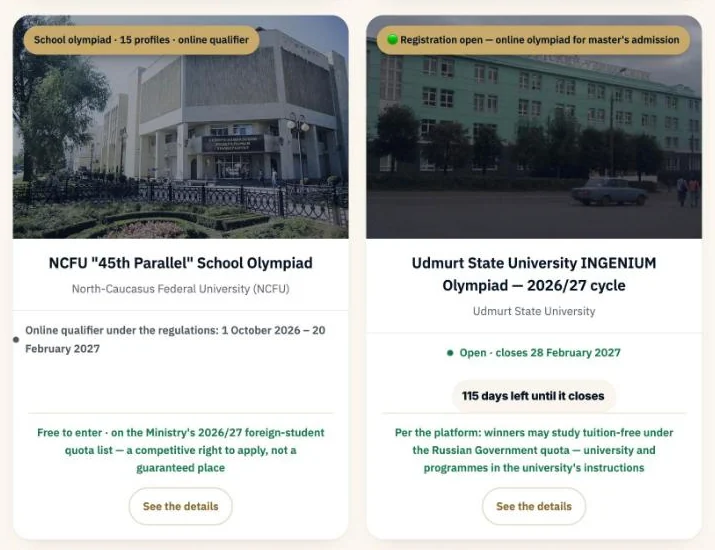 1
- 1On the home page athar.ac/en, the “Udmurt State University INGENIUM Olympiad” card appears among the featured opportunities. Click “See the details”.
Or open the olympiad page directly: athar.ac/en/opportunities/udsu-ingenium
Or search the opportunities index
Tried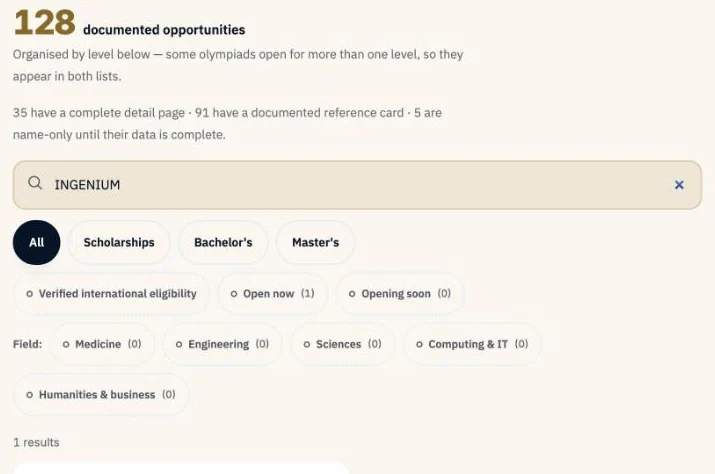 1
- 1Type INGENIUM in the search box. One result appears; open it. Don't confuse it with the same university's EXAMUS INT olympiad.
The olympiad page on ATHAR
Tried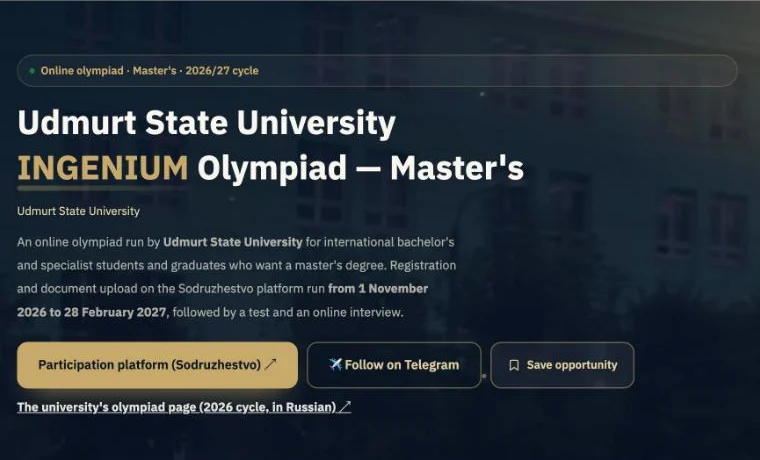 12
- 1“Participation platform (Sodruzhestvo)” opens the olympiad's page on the platform (step 6). This is the participation button.
- 2“The university's olympiad page (2026 cycle, in Russian)” is for reference only; its dates belong to an earlier cycle.
- Step complete
- When you have noted: registration and documents before 00:00 on 1 March 2027, and the test before 00:00 on 14 February 2027 (Moscow time). The last full days are 28 and 13 February.
Read the required documents
Tried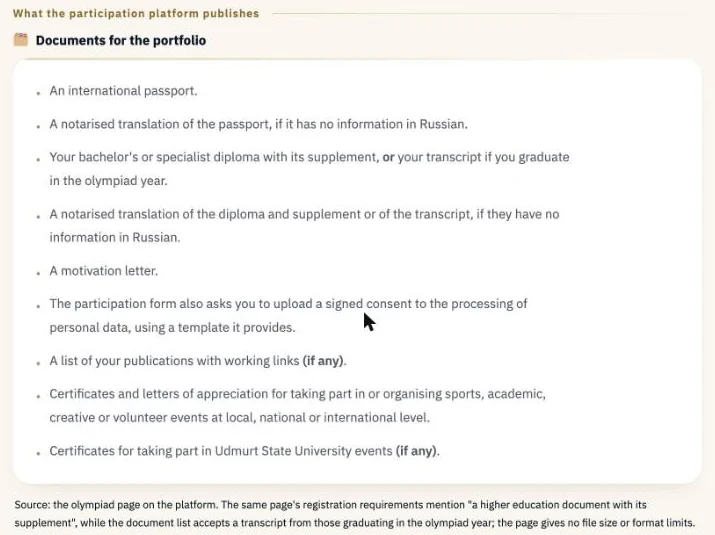 1
- 1The portfolio list as the platform publishes it, plus the consent the form asks for.
Check the steps and dates
Tried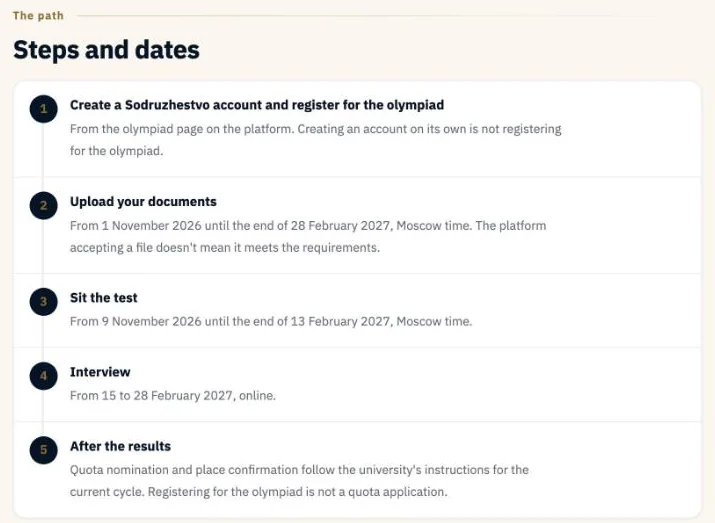
The olympiad page on Sodruzhestvo
Tried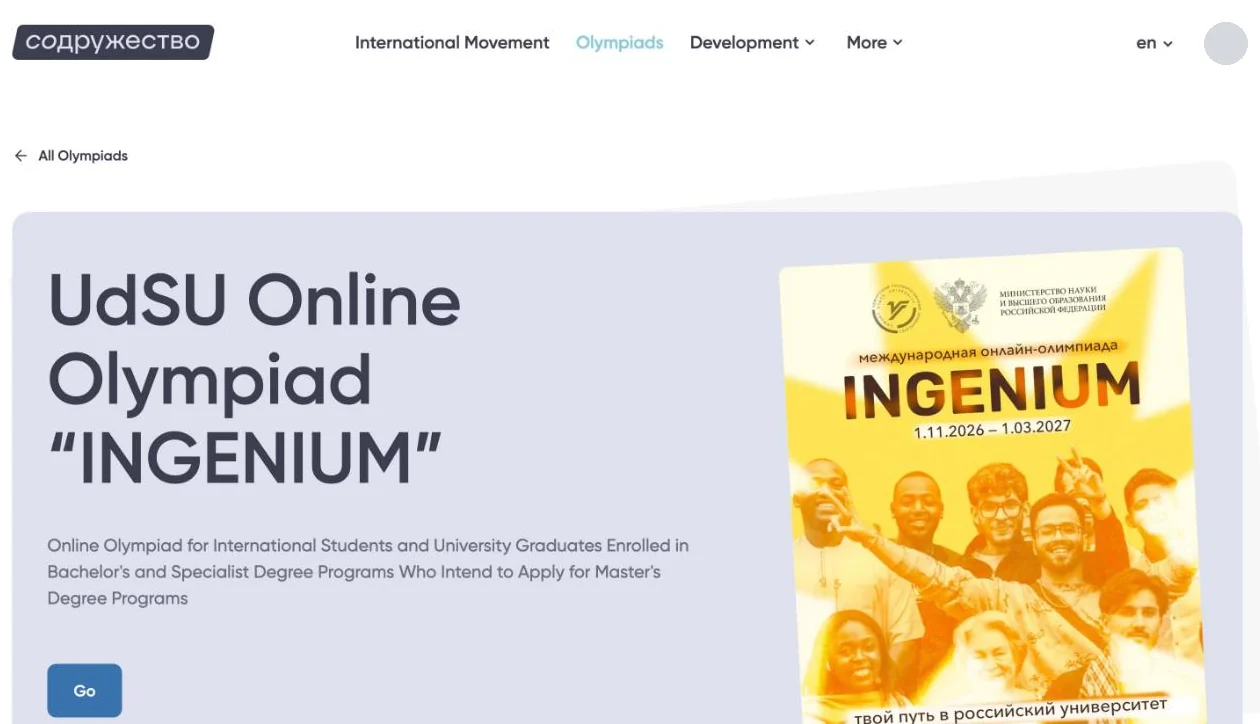 1
- 1“Go” takes you to the participation stage. If you aren't signed in, the platform asks you to sign in first.
The olympiad's stages
Tried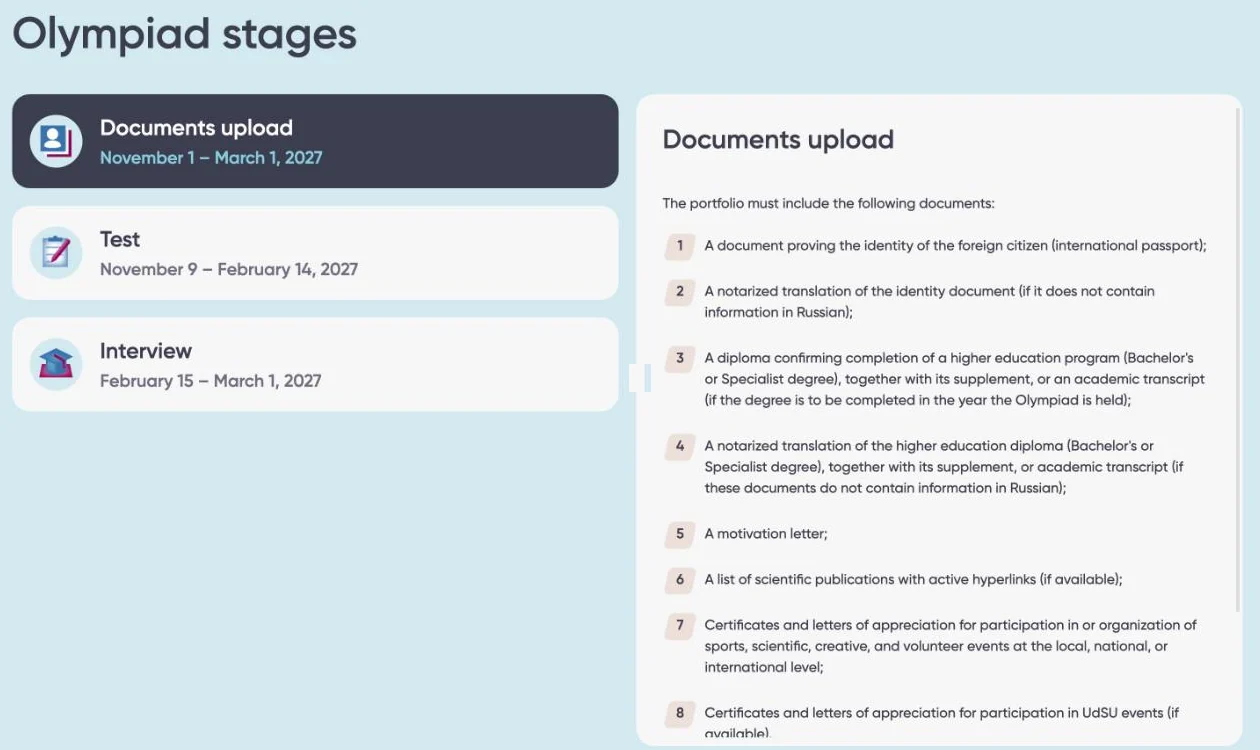 12
- 1“Documents upload” is the registration stage itself. It starts on 1 November 2026, and its end shows as “March 1, 2027”: it closes before 00:00 on 1 March 2027, Moscow time, so the last full day is 28 February (p. 18).
- 2The portfolio list, with eight items.
Sign in, or create an account
Official sourceOne sodrujestvo.org account covers every olympiad on the platform; if you already have one, don't create another. You're done when “Go” opens the participant form.
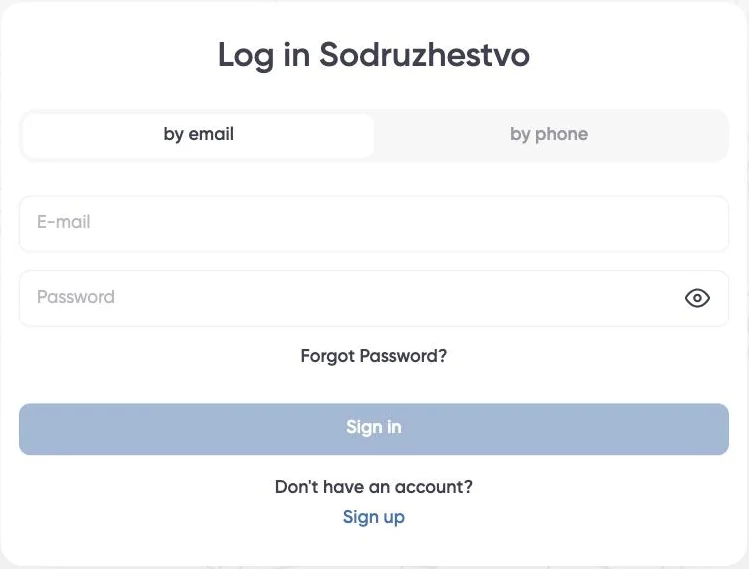 123
You already have an account:
- 1Choose “by email” or “by phone”, whichever you registered with.
- 2Enter your email and password, then “Sign in”. Forgotten it? “Forgot Password?”.
- 3No account yet? “Sign up”.
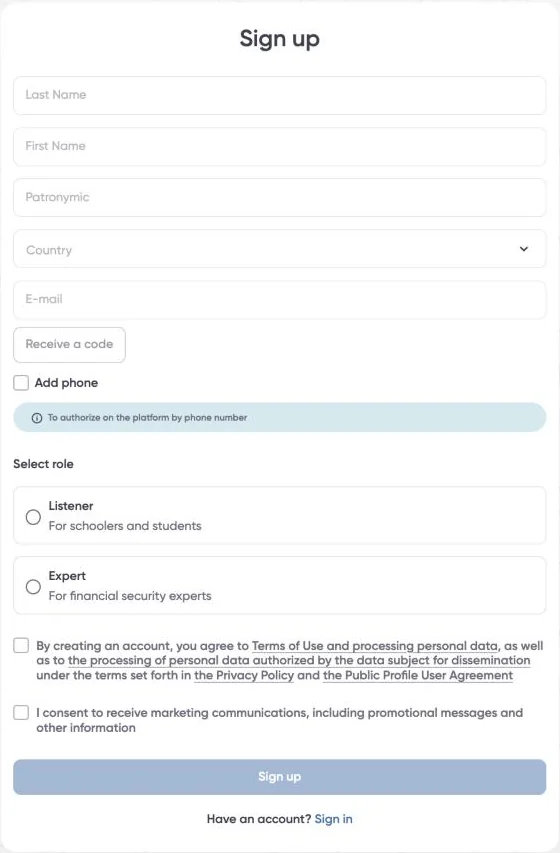 123456
You don't have an account:
- 1Your name as in your passport, in Latin letters.
- 2“Country”: your country.
- 3Enter your email, press “Receive a code”, and type in the code sent to that email.
- 4“Add phone” is optional; it lets you sign in with your phone number later.
- 5Role: “Listener” (for school and university students). This is your account's role on the platform, not the participant category in the form.
- 6Tick the terms box (required), then “Sign up”. The marketing box is optional.
The sign-in and sign-up screens as they appear on the platform on 6 November 2026, with no data. For more detail, see our HSE guide, which uses the same platform.
The top of the form
Tried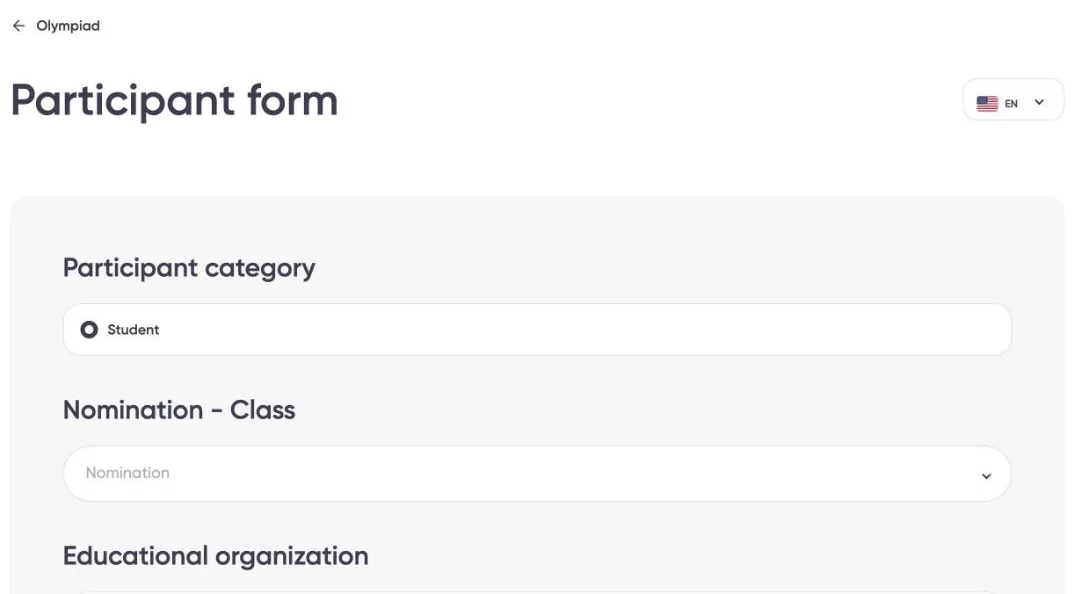 12
- 1Participant category: “Student” is the only option shown.
- 2“Nomination”: the only option is “INGENIUM”. You don't choose a field here.
Your university, test language and studies
Tried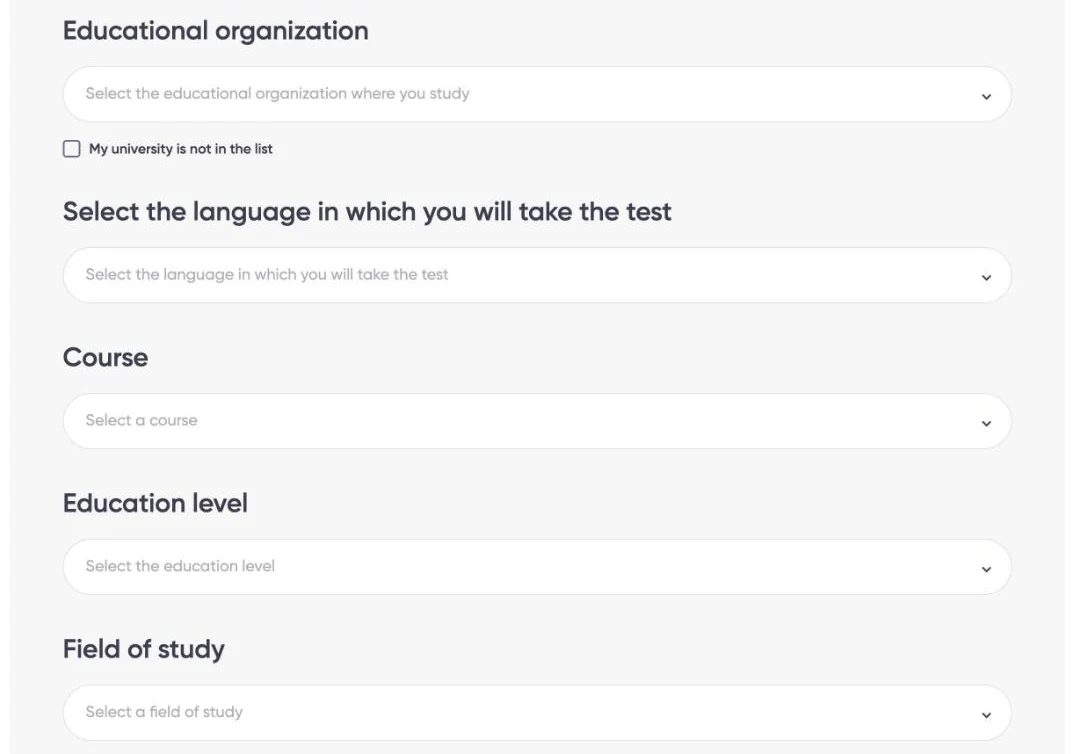 123456
- 1“Educational organization”: the university you study at or graduated from.
- 2If it isn't in the list, tick “My university is not in the list”.
- 3Test language: Russian, English or French.
- 4“Course”: your year of study.
- 5“Education level”: bachelor's, master's or specialist; choose what actually matches your qualification.
- 6“Field of study”: your current field from a general classifier, not the olympiad's direction.
General information
Tried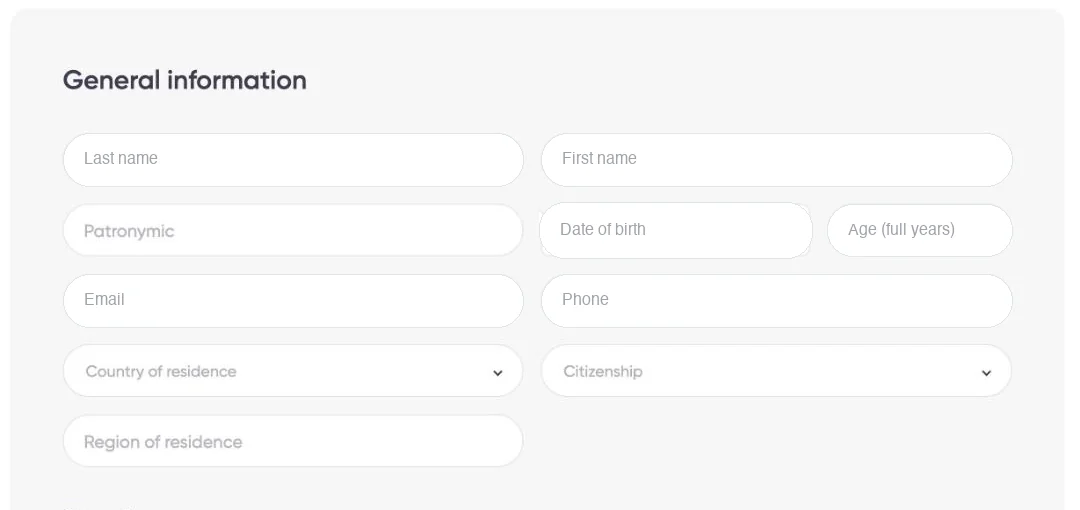 1
- 1Name, date of birth, email, phone, country and citizenship. Some may be filled in from your account; check them against your passport.
Gender and identity document
Tried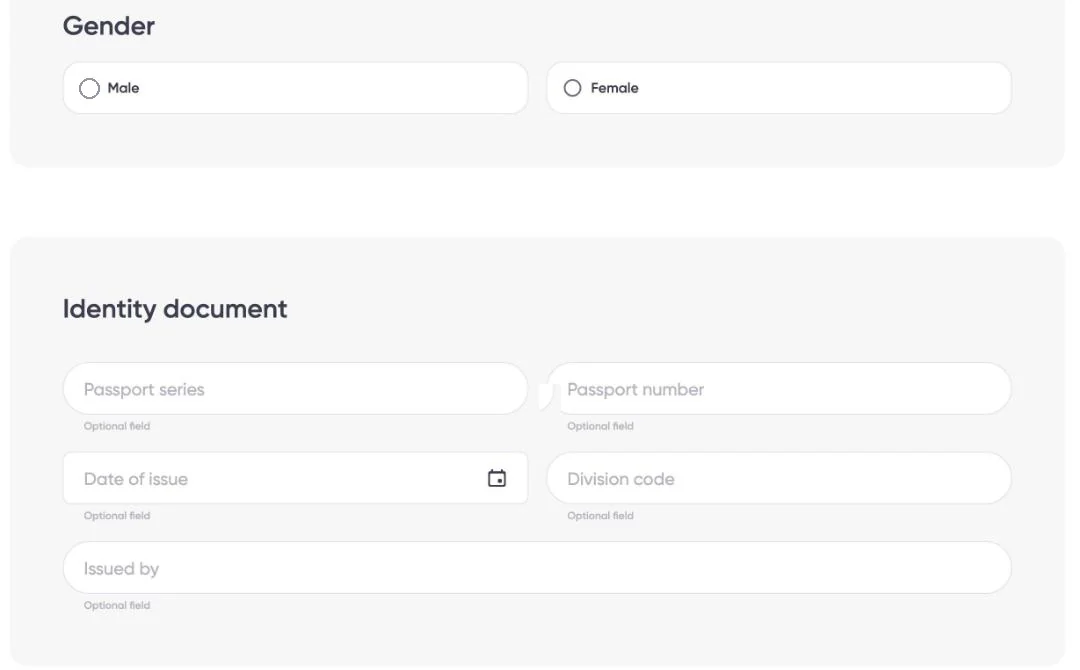 12
- 1Gender.
- 2Passport details: every field is marked “Optional field” in this form.
Consent, place of birth and Russian citizenship
Tried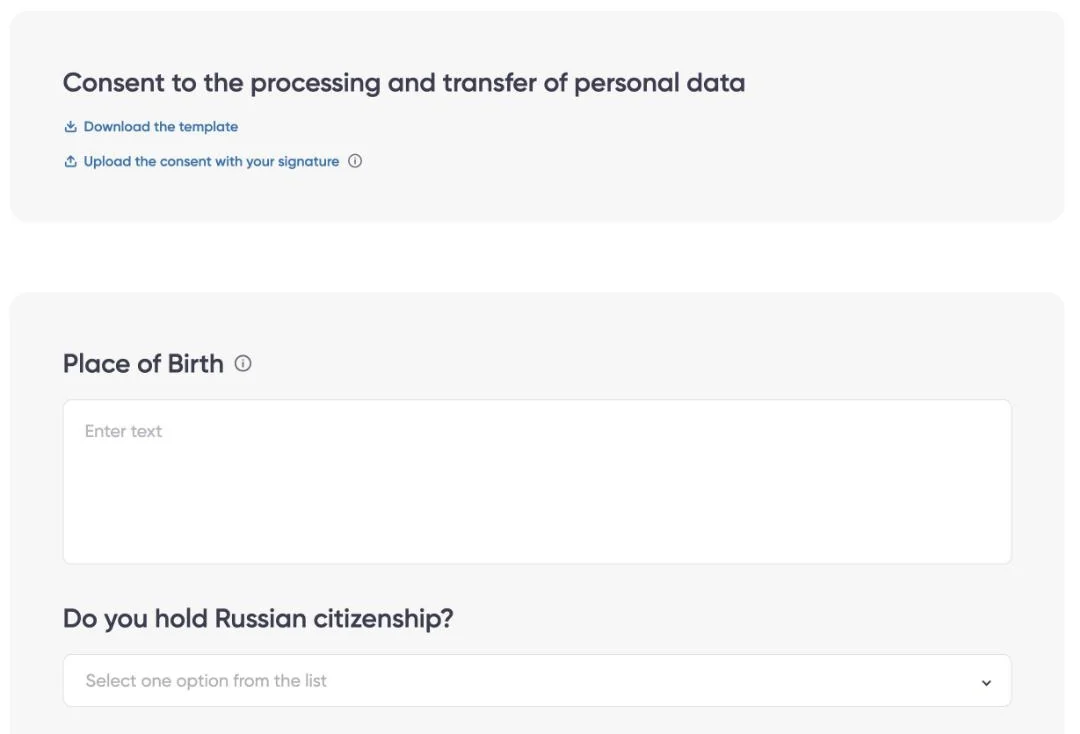 1234
- 1Download the personal-data consent template.
- 2Sign it, then upload it here.
- 3Place of birth, as in your passport.
- 4Do you hold Russian citizenship?
The end of the form
Tried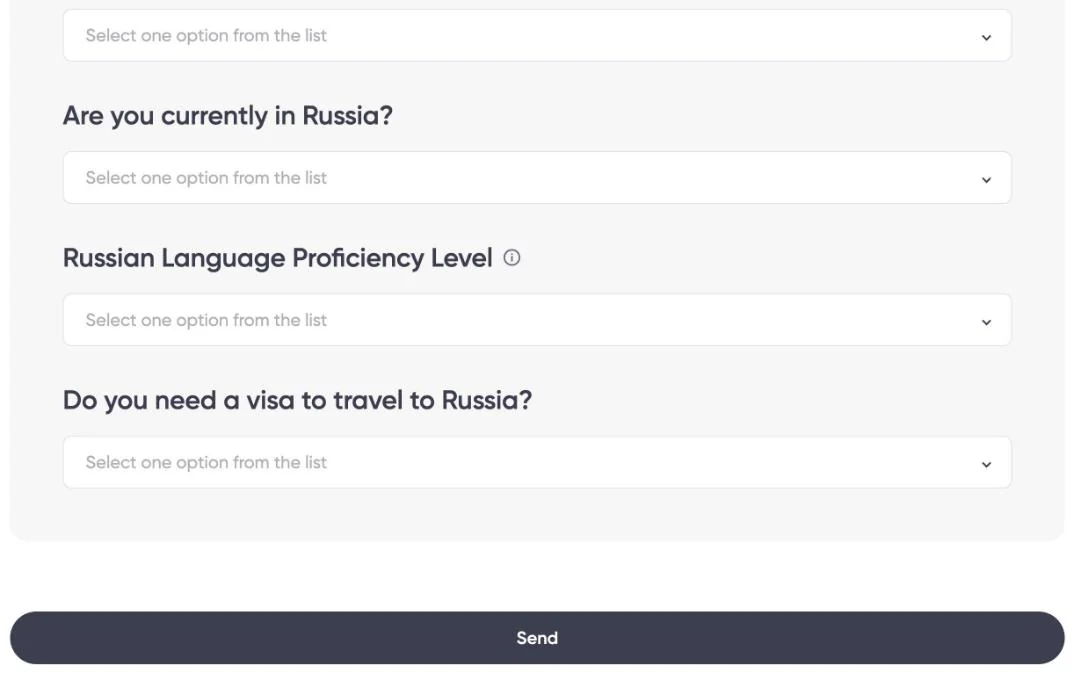 1234
- 1Are you currently in Russia?
- 2Your Russian level: choose from the list what matches your real level.
- 3Do you need a visa to travel to Russia?
- 4“Send” submits the form. A confirmation then says you can't edit it afterwards unless moderation returns it. Check every field before you press it.
The journey after the form
Sending the form is only the first stage. Each stage after it has its own status and its own dates.
- 1 · The form“Send”, then the status becomes “Moderation”
Tried - 2 · Document upload13 tasks in the account; each file is sent on its own
Opened, nothing sent - 3 · Follow the statusOn the “My Olympiad” page
Tried - 4 · Test and interviewWhen the platform opens them
Not tried
The platform shows a confirmation: after submission you can't edit the form; changes are possible only if moderation returns it to you for revision.
What we documented
We sent the form from one participant's account on 6 November 2026. What follows is what appeared in that account; we don't claim every participant sees exactly the same.
- Next
- Open “My Olympiad” from the account menu and choose the olympiad (next page).
“My Olympiad”: four separate statuses
Tried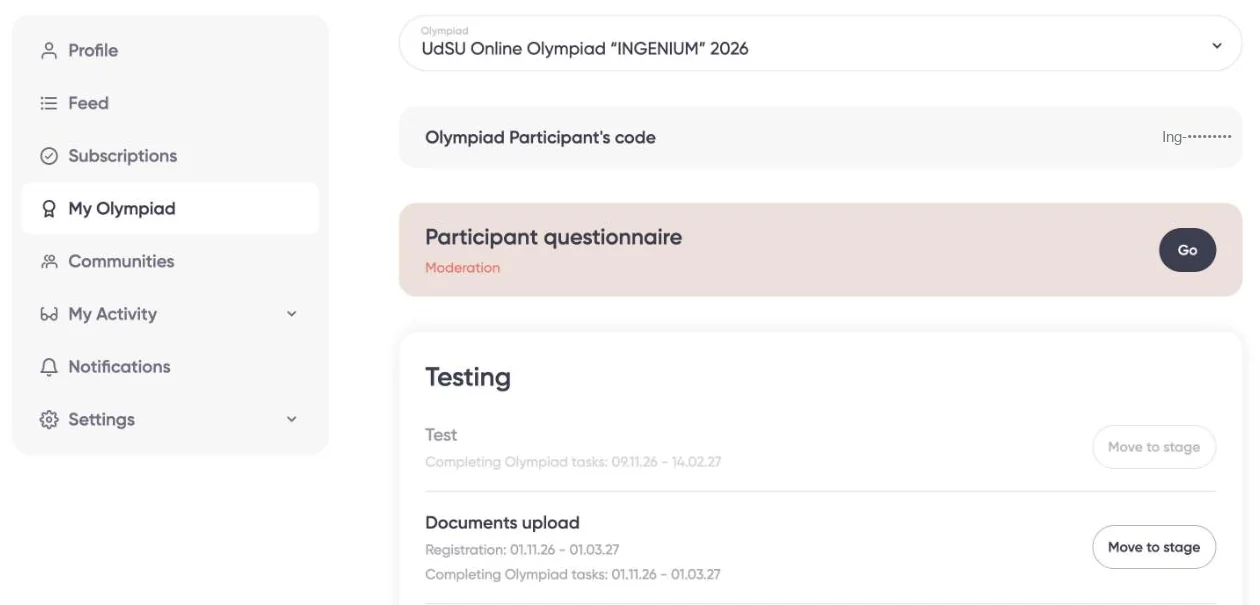 12
- 1“Participant questionnaire · Moderation”: this status is about the form only. It means the form is under review. It doesn't prove your documents are complete, or that you're eligible.
- 2“Documents upload”: a separate stage with an active “Move to stage” button. The test and interview buttons were greyed out on 6 November 2026.
| Stage | What “My Olympiad” showed | When it closes (stored platform value) |
|---|---|---|
| Form | Moderation | — |
| Documents upload | 01.11.26 – 01.03.27, active | Before 00:00 on 1 March 2027, Moscow time (UTC+3); last full day 28 February |
| Test | 09.11.26 – 14.02.27, greyed out | Before 00:00 on 14 February 2027, Moscow time; last full day 13 February |
| Interview | 15.02.27 – 01.03.27, greyed out | Before 00:00 on 1 March 2027, Moscow time; last full day 28 February |
The account shows the date only. The olympiad's page data stores each end as midnight at the start of that date: 2027-03-01T00:00+03:00 and 2027-02-14T00:00+03:00. So documents close before 00:00 on 1 March 2027, Moscow time, which is before 1 March begins; the last full day is 28 February. The test closes before 00:00 on 14 February; its last full day is 13 February. 1 March and 14 February themselves are not available. The deadline is the same; only the way it's displayed differs. We haven't tested whether the platform accepts a file in the last minutes, so don't leave anything to the last day.
The “Document Upload” task
Opened, nothing sent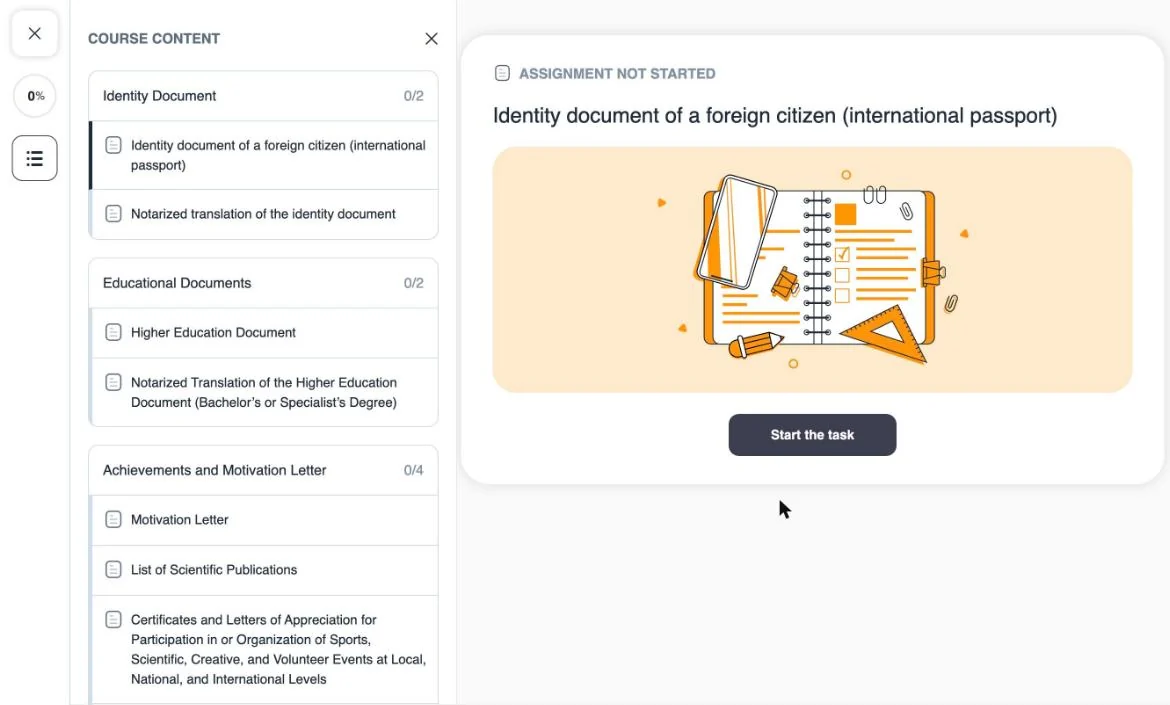 12
- 113 tasks in 4 groups. Each starts as “Assignment not started” and progress shows 0%.
- 2The instructions only appear after “Start the task”. Starting a task doesn't send anything.
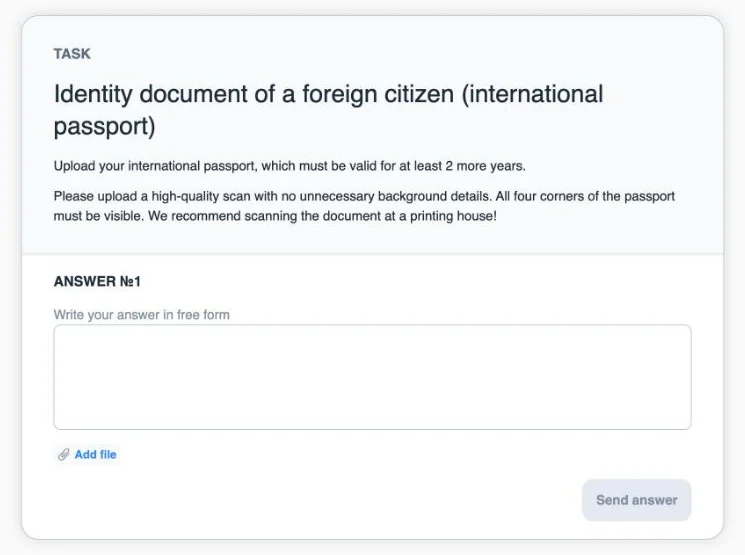 123
- 1The task's instructions (here: the passport).
- 2“ANSWER №1”: a free-text box and “Add file”.
- 3“Send answer” stays disabled while the answer is empty. We saw no separate Save button. That doesn't prove the answer is final, or that it can be edited: we haven't checked either. Review the file before you send it.
The 13 tasks: what each one asks
Taken from each task's instructions in the account we documented, on 6 November 2026. None of them states a deadline beyond the stage dates, or a file format, size or count.
| Task | What the instructions ask | Is the document required? | Its translation |
|---|---|---|---|
| International passport | Valid “for at least 2 more years”; a high-quality scan, all four corners visible. The instructions don't say from which date the 2 years are counted. | Required in the text | See the next row |
| Passport translation | Notarised; all completed pages | — | Required when the condition applies “If the original document does not contain information in Russian”. Not optional when that applies. |
| Higher education document | Diploma with the full supplement. A current student uploads “a certificate from your university and an academic transcript”. | “You must” in the text | See the next row |
| Diploma translation | Notarised; all completed pages | — | Required when the condition applies Same condition: the original has no Russian. |
| Motivation letter | See the next page | On the public list, without “if any” | Not stated |
| List of publications | Titles with links to publicly accessible pages | Only if you have them “If any” on the public list. The task in the account doesn't make it required for everyone. | Not stated |
| Certificates (events at all levels) | “All your achievements from the past two years” | A slot; required or optional isn't stated | Not stated |
| Certificates (UdSU events) | Same wording | Only if you have them “If any” on the public list. | Not stated |
| 5 medical certificates | General fitness to study in Russia; and the absence of syphilis, HIV, hepatitis B and C, and tuberculosis (chest X-ray / fluorography) | A slot with instructions; not on the public list; due date not stated | Required when the condition applies Notarised, if the document has no Russian. |
A task in the account doesn't make a document mandatory. If you have no publications or certificates, don't upload empty files or made-up proof just to fill the progress bar.
The motivation letter and the medical certificates
The motivation letter
- Length: 1,500–2,500 characters, including spaces.
- Content, as the task states: your goals in taking part in the olympiad; your academic, educational and extracurricular experience; your professional experience (work and internships); and your goals during your studies and after graduation.
- Not stated: the letter's language, its format (typed into the box or attached as a file), and whether your name must be hidden. Don't assume the language from the test language you chose, and don't carry over rules from other olympiads.
The medical certificates
Their tasks did appear in the account, but nothing says when they're needed: to take part, after winning, or at enrolment. Nothing says how long a certificate stays valid either.
Before you get the medical certificates, check with the organiser when they must be submitted and how long they stay valid, so you neither get them too early nor miss the date they're required.
Questions to ask the organiser
- The motivation letter's language and format.
- When the medical certificates are due, and how long they stay valid.
- Whether an answer can be edited after “Send answer”.
Organiser: [email protected]. Write to them yourself, in your own name.
The test, the interview and the results
We haven't tried these stages; their buttons were not active yet on 6 November 2026. What follows is from the platform page.
| Question | What we know | Tag |
|---|---|---|
| The test | 20 closed questions in your field, from 9 November 2026; it closes before 00:00 on 14 February 2027, Moscow time (last full day 13 February). | Official source |
| The interview | Online, with members of the organising committee, 15–28 February 2027. | Official source |
| A practical or creative task | It existed in earlier cycles; the current cycle's stages don't mention it. | Not verified |
| After the results | The platform says winners may study tuition-free under the Russian Government quota; details of confirming the place are in the university's instructions. | Official source |
How to prepare for the interview
These are tips, not official requirements or scores, and they don't guarantee a win.
- Understand the programme you want for your master's, and why you're choosing it at this university.
- Read the professors' interests and their published research in your field.
- Prepare a realistic research interest, or two or three initial ideas, and be ready to discuss them.
- Explain your real project: what it is, your role, its results and its limits. Never present experience that isn't yours.
The organisers announced in the olympiad's Telegram channel (31 March 2025) that the interview asks about your previous education and motivation for a master's, why you want to study abroad, what you have studied or researched in your field, and your planned master's thesis topic. The current cycle may differ.
Checklist before sending
- You've checked that the level and graduation-year conditions apply to you.
- Your details in the form match your passport.
- You've chosen the test language you want.
- You've downloaded, signed and uploaded the consent.
- Your notarised translations are ready or in progress.
- Your motivation letter is 1,500–2,500 characters, including spaces.
- You've reviewed every file before “Send answer”.
- You've noted, in Moscow time: the test closes before 00:00 on 14 February 2027, and registration before 00:00 on 1 March 2027 (last full days: 13 and 28 February).
Help links
- Organiser: [email protected]
- The olympiad on the platform: sodrujestvo.org/en/olympiads/onlain-olimpiada-udgu-ingenium
- The olympiad on ATHAR: athar.ac/en/opportunities/udsu-ingenium
- The olympiad's channel: t.me/ingenium_udsu
Version log: 1.0 (6 November 2026): first published version, after the owner's review; the test and the interview were not tried, and the points that need the university's answer are stated as open. 0.9 (6 November 2026): draft for review; steps from ATHAR to the Send button, including signing in and creating an account, without submitting an application. Rev. 3: the form sent from one documented account; the “My Olympiad” statuses; the 13 document tasks, opened without sending any file; the journey diagram.
Sources and the account read on 5 and 6 November 2026.