

Registering for the HSE University International Olympiad — Bachelor's and Master's
This guide takes you from the olympiad page on ATHAR to signing in to (or creating) your account on the Sodruzhestvo platform, filling in and sending the participant form, and following your application up to the assessment. It covers both the Bachelor's and Master's tracks: the general platform steps are documented, the illustrated worked example is a Bachelor's application, and Master's differences and the limits of what we verified have their own section.
Screens and dates may change; check the platform page before each step.
Contents
- Who can take part?p. 3
- Documents to prepare firstp. 4
- Part 1 — From ATHAR to the programme page (steps 1–7)p. 5
- Part 2 — Your platform account (steps 8–10)p. 9
- The Master's track: what differs, and what we verifiedp. 12
- Part 3 — The participant form, Bachelor's example (steps 11–15)p. 13
- Part 4 — Sending and follow-up (steps 16–20)p. 18
- Final checklist and helpp. 21
How to read this guide
Each step carries a track badge: Both tracks for account and navigation steps, or Bachelor's for what we tried in the Bachelor's application only. Master's differences are gathered on the Master's track page.
- Tried Done for real on ATHAR or on the platform on 5 November 2026.
- Official source Shown on an HSE page or in the platform interface, but not carried through to the end.
- Not verified Not available yet, or not found in an official source.
Each step has a screenshot with numbered gold boxes and an explanation for each number. Boxes headed “Now” or “Done when” sum up what to do and how to tell you have finished. Personal data in the screenshots is hidden.
Once you press “Send”, you cannot edit the form unless the review sends it back to you for corrections. Check everything in step 16 first.
Who can take part?
| Question | What the official sources say | Badge |
|---|---|---|
| Citizenship | Foreign citizens and stateless persons | Official source |
| Bachelor's track | “учащиеся 10–11 классов (для 11-летней системы обучения) или 11–12 классов (для 12-летней системы)”: pupils in grades 10–11 (in an 11-year school system) or grades 11–12 (in a 12-year system) | Official source |
| Master's track | “выпускники программ бакалавриата или специалитета”: graduates of bachelor's or specialist (специалитет) degree programmes | Official source |
| Age | The sources we reviewed give no age limit | Official source |
| Previous quota | Anyone studying or who has studied on a quota at a given level cannot compete for it again at that level | Official source |
The education document differs by track
| Track | Name on the platform | What it is |
|---|---|---|
| Bachelor's | “Education Document (Certificate)” · “Документ об образовании (справка из школы)” | A certificate from your school confirming that you study there, stamped by the school office |
| Master's | “Educational Document (Certificate)” · “Документ об образовании (диплом/справка из вуза)” | Your bachelor's diploma, or a certificate from your university |
This is the eligibility scope as stated in the current text at admissions.hse.ru/olymp. The education document alone does not decide eligibility, and a category the text does not mention is left open by the sources; if your situation falls outside this scope, ask HSE before applying.
The platform lets you send the form before anyone reviews it. The thank-you message confirms that your application was received — not that you are eligible or admitted. Review, the test and the results come after that. A strong result earns a recommendation to compete for a quota place, not a guaranteed place.
- Now
- read the conditions above at admissions.hse.ru/olymp, then get the education document for your track ready before you start.
Documents to prepare first
The Bachelor's form has three upload slots. Each file must be pdf, jpg, jpeg or png, up to 20 MB (as the platform states when you upload). Tried
| Document | At olympiad registration and assessment | Later (nomination and admission) |
|---|---|---|
| Bachelor's School certificate Step 12 · source: programme page on the platform | A clear scan or photo of the certificate, in one file. | At enrolment: the original, with a certified Russian translation if it is in a foreign language (HSE Bachelor's admissions FAQ). Not a condition for uploading the certificate to the olympiad. |
| Master's Portfolio of achievements and documents Source: all 128 Master's programme pages on the platform (identical text) | At registration and assessment: the participant form, a document confirming your level of education (diploma or university certificate), a motivation letter and a CV. You may add recommendations, publications, grants and other documents. Check your programme's page before uploading. | At nomination and admission: as HSE instructs for your admission route and campus. Example from Master's admission documents, HSE St Petersburg: a notarised Russian translation unless the document already has a Russian version, legalisation unless an international agreement exempts it, and recognition that can be completed after applying. These are not conditions for uploading the portfolio. |
| Copy of your identity document (passport) Step 14 · source: programme page | A clear image of your passport's data page. | As HSE instructs at enrolment. |
| Consent to data processing Step 15 · source: the form itself | A two-page template you download from the form, fill in, sign, and upload as a scan or photo in one file. | — |
| An email address you read | All further information, including the schedule, goes there. | — |
If your document is in a language other than Russian or English, it is best to have a Russian translation ready. This is advice, not a registration requirement: the official translation and certification requirements are completed at admission and enrolment, following HSE's instructions, and the details differ by track, as the table shows.
- Get your documents ready before you start
- three readable files, each under 20 MB.
- Multi-page documents
- Combine the pages into one pdf, since each document has a single upload slot.
Open ATHAR
Both tracksTried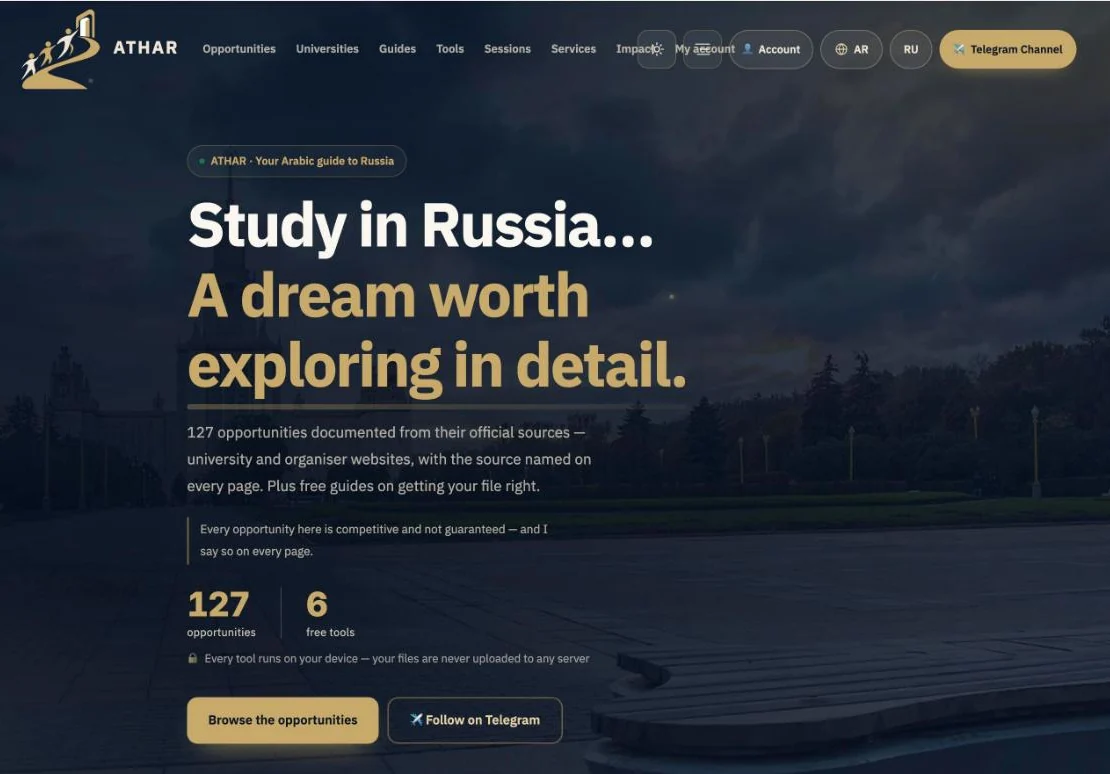 1
- 1On the home page athar.ac/en, press “Browse the opportunities” to open the opportunities index.
Or skip steps 1–4 by opening the olympiad page directly: athar.ac/en/opportunities/hse-international-olympiad
Search for HSE
Both tracksTriedType HSE into the search box. Several opportunities from the same university appear.
Pick the right card
Both tracksTried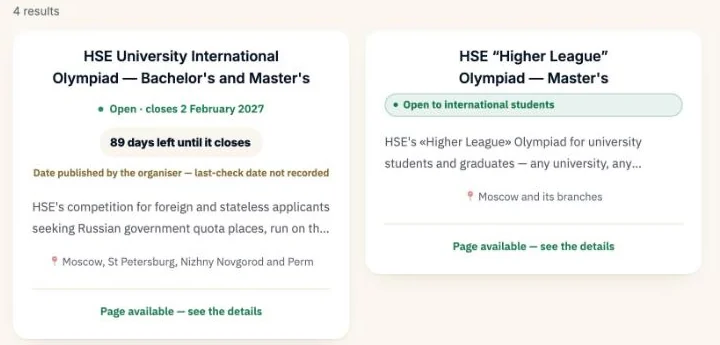 12
- 1Open “HSE University International Olympiad — Bachelor's and Master's”. Do not confuse it with the Youth Olympiad МОМ, “Higher League” or “Vysshaya Proba”: those are separate competitions with their own rules.
- 2The yellow line means the date is quoted as HSE announced it. Confirm it on the platform page (step 8) before you plan around it.
The olympiad page: three different dates
Both tracksTried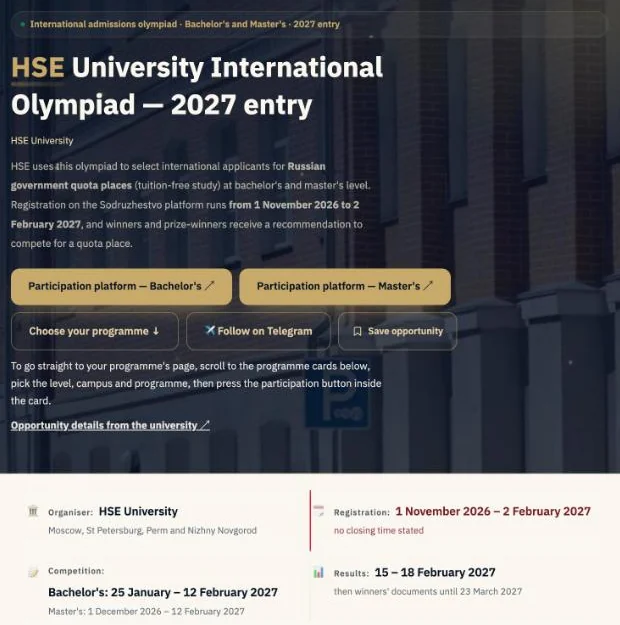 12345
- 1The title: entry to university in September 2027.
- 2“Participation platform — Bachelor's” and “Participation platform — Master's” open the two track pages on the Sodruzhestvo platform (step 8 and the Master's page). HSE's own page is a secondary link below them.
- 3“Choose your programme ↓” takes you down this page to the programme cards (step 6); it does not open an external site.
- 4Registration opens on 1 November 2026 and closes on 2 February 2027. HSE gives no closing time, so do not leave it to the last day.
- 5The test (Bachelor's competition) runs from 25 January to 12 February 2027 — so the test starts while registration is still open.
- Done when
- you have noted the registration deadline and the test window.
Read the eligibility note
Both tracksTried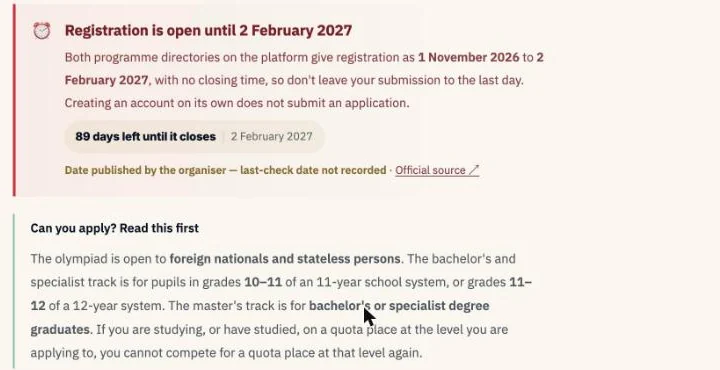 12
- 1Creating an account is not the same as applying: the application is sent from the participant form (Part 3).
- 2The Bachelor's track is for pupils in grades 10–11 (or 11–12). Details on the Who can take part? page.
Find your programme
Both tracksTried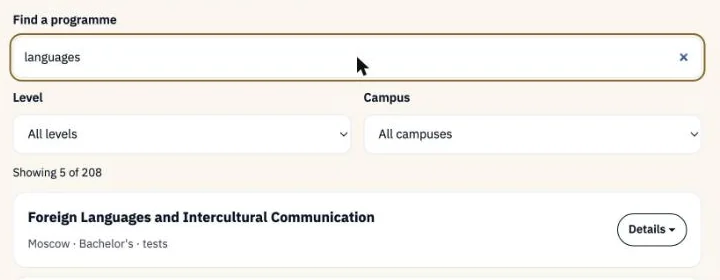 123
- 1Type part of the subject's name into “Search for a programme”. For example, “languages” shows 5 of the 208 programmes across both tracks.
- 2Filter by level (Bachelor's or Master's) and campus (Moscow, St Petersburg, Perm, Nizhny Novgorod).
- 3Press “Details” on the programme you want.
Programme card and participation link
Both tracks · Bachelor's exampleTried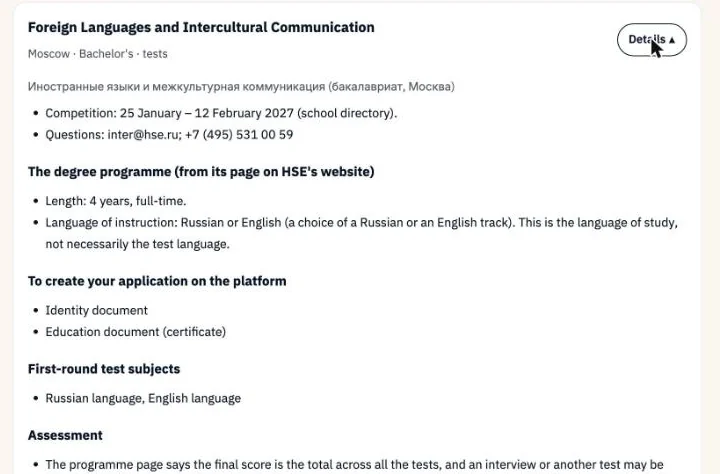 123
- 1Language of study at the university: Russian or English for this programme. This is not the test language (step 12).
- 2Required documents: an identity document and an education document (see Documents).
- 3Test subjects for this programme: Russian language and English language. Subjects differ from programme to programme.
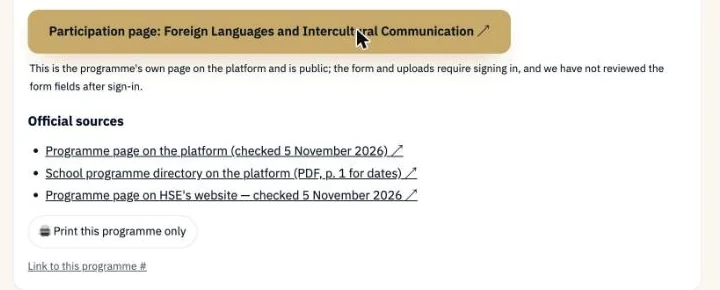 12
- 1Press “Participation page” to open the programme's page on the Sodruzhestvo platform.
- 2That page is public; the form itself needs you to sign in (step 9).
The programme page and the “Go” button
Both tracks · Bachelor's exampleTriedSwitch the interface from ru to en at the top of the page; all platform screenshots from here on use the English interface. The form is the same for every Bachelor's programme; the screenshots come from “Advertising and Public Relations”, Moscow.
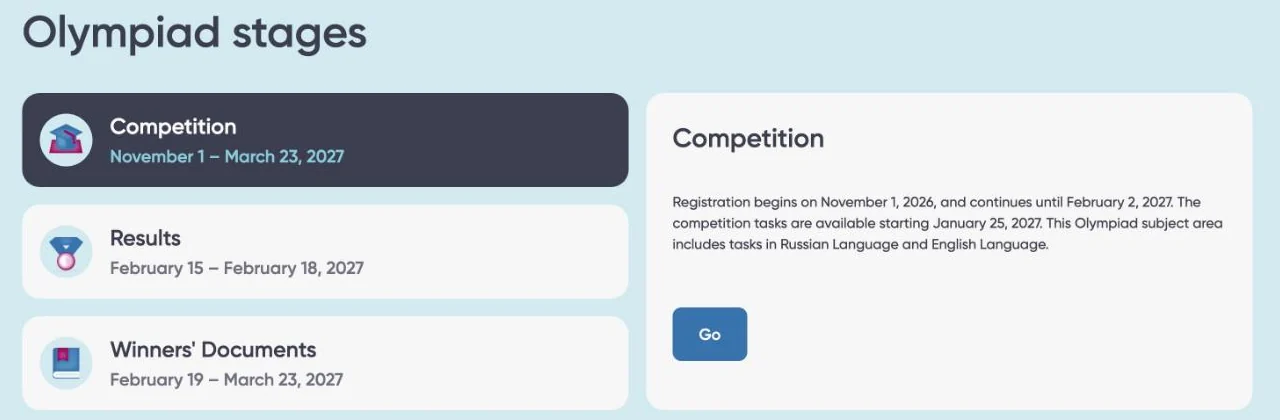 123
- 1The olympiad's stages on the platform: “Competition” from 1 November 2026 to 23 March 2027 (the whole stage, registration and test included), then “Results” and “Winners' Documents”.
- 2Within that stage: registration closes on 2 February 2027, the test starts on 25 January 2027, and the test covers Russian and English.
- 3Press “Go”. If you are not signed in, the sign-in page appears (step 9).
Sign in, or create an account
Both tracksOfficial sourceOne sodrujestvo.org account covers every olympiad on the platform; if you already have one, do not create another. sodrujestvo.org · Sign in — you are done when “Go” opens the form.
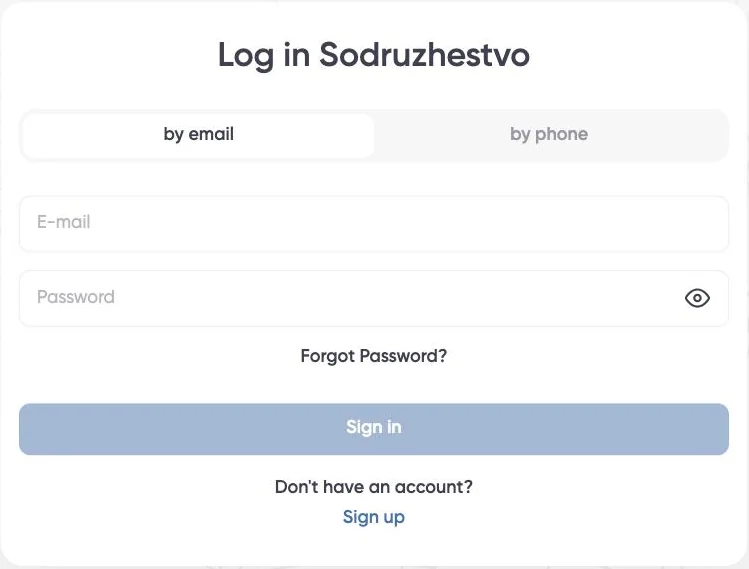 123
You already have an account:
- 1Choose “by email” or “by phone”, whichever you registered with.
- 2Enter your email and password, then “Sign in”. Forgotten it? “Forgot Password?”.
- 3No account yet? “Sign up”.
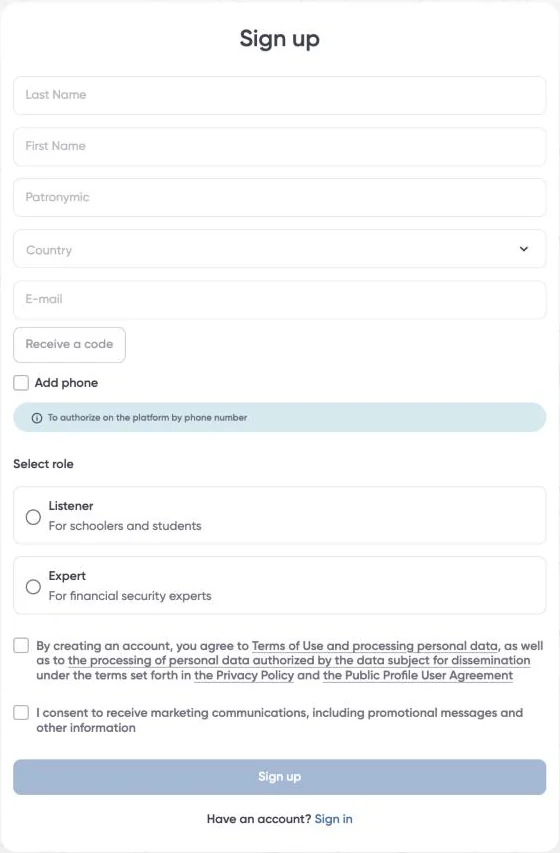 123456
You do not have an account:
- 1Your name as in your passport, in Latin letters (details at the top of the next page).
- 2Country: your country.
- 3Enter your email, press “Receive a code”, and type in the code sent to that email.
- 4“Add phone” is optional; it lets you sign in with your phone number later.
- 5Account role: “Listener” (for schoolchildren and students). This is your account's role on the platform, not the participant category in the application (step 11).
- 6Tick the terms box (required), then “Sign up”. The marketing box is optional.
Copy your name as your passport records it, checking the data page itself along with the two MRZ lines below it. In the MRZ the surname comes first; after the << separator come your given names as the passport records them. P<EGYHASSAN<<AHMED<MOHAMED<ALI<<<<<<
| Last Name | HASSAN | First Name (given names) | AHMED MOHAMED ALI |
What the programme page asks for
Both tracks · Bachelor's exampleOfficial source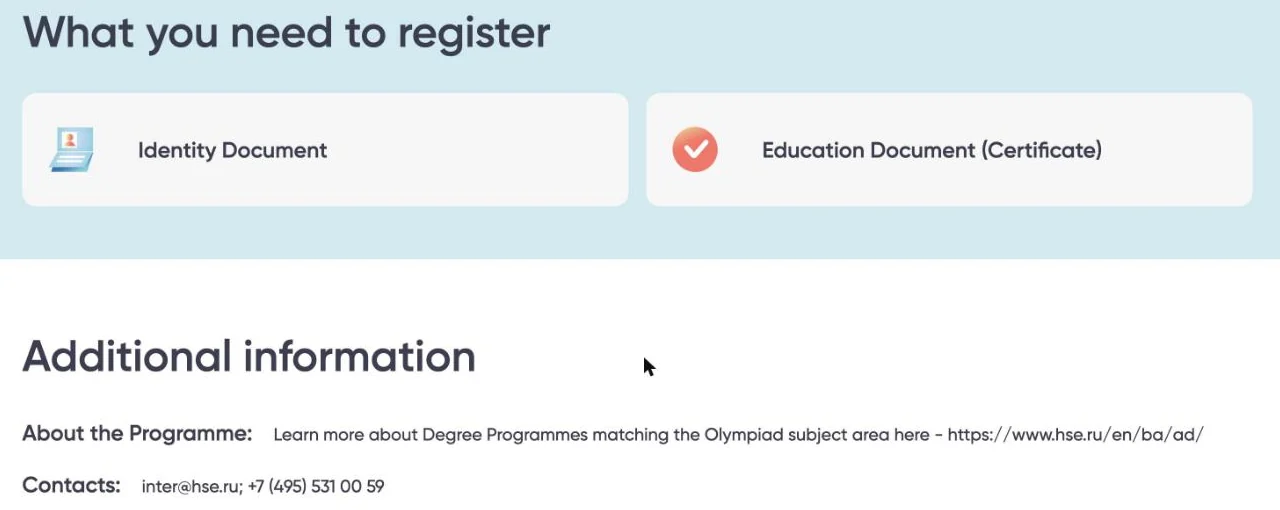 123
- 1“Identity Document”: your passport.
- 2“Education Document (Certificate)”: the Russian page specifies “справка из школы”, a certificate of enrolment from your school. The English word “Certificate” is broader than the original, so go by the Russian meaning.
- 3A link to the programme on the HSE website, and the enquiries address [email protected].
Between the account and the form
Your account details (name, date of birth, email, phone and gender) appear in the form already filled in Tried. Country of residence, citizenship, address, school and files are filled in inside the form itself, and every programme you apply to has its own form.
- Now
- make sure your three files are ready, then go back to the stages and press “Go”.
The Master's track: what differs, and what we verified
Master'sOfficial sourceThe account and navigation steps (1–6 and 8–9) are the same for both tracks. Master's programmes, though, sit on a separate platform page: “HSE University International Olympiad (for International Undergraduate Students)”, with 128 programmes. sodrujestvo.org · Master's
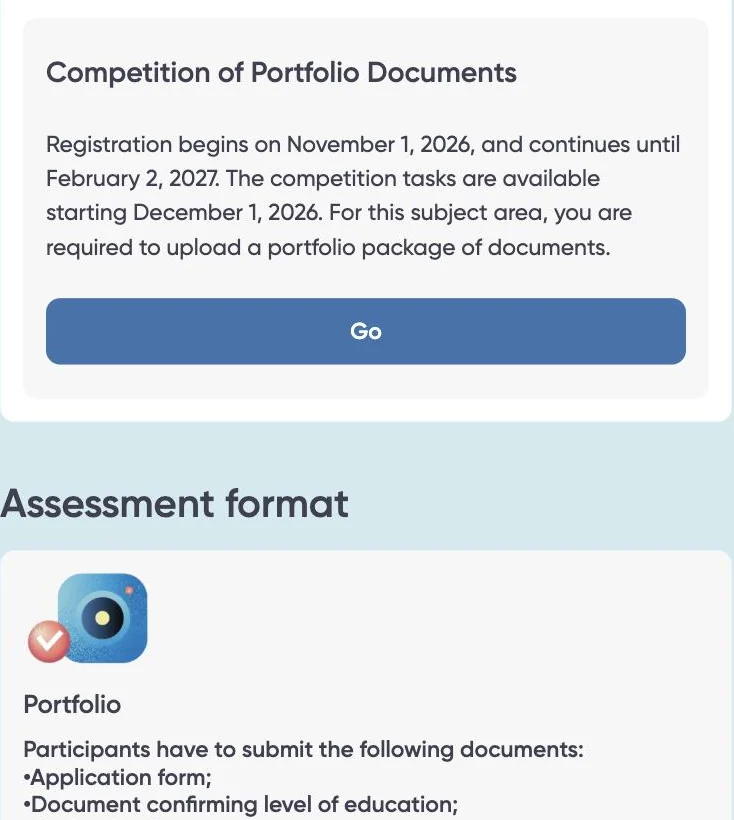 12
- 1“Competition of Portfolio Documents”: registration from 1 November 2026 to 2 February 2027; competition tasks open on 1 December 2026. No time or time zone is given.
- 2Assessment is based on the portfolio, and may include a test or interview depending on the programme. Some programmes list an extra stage, such as “Собеседование” (interview) for the St Petersburg UX programme; check your programme's stages on its card and page.
| Item | For the Master's | Badge |
|---|---|---|
| Portfolio of achievements and documents | All 128 programme pages give the same general list: the participant form, a document confirming your level of education, a motivation letter and a CV; recommendations, further education documents, publications and grants may be added. This does not replace programme-specific stages; check your programme's page and assessment criteria before uploading | Official source |
| Education document | “Документ об образовании (диплом/справка из вуза)”: your diploma or a certificate from your university | Official source |
| Participant category, form fields and portfolio upload slots | We did not open the Master's form, since that requires starting an application. Follow what the form itself shows | Not verified |
| Confirmation window, thank-you message and application status | Not tried for the Master's; the screenshots in steps 16–19 come from a Bachelor's application | Not verified |
- Get your portfolio ready before you start
- education document, motivation letter and CV, each as a clear file; then follow steps 8–9 from your Master's programme page.
Top of the form
Bachelor'sTried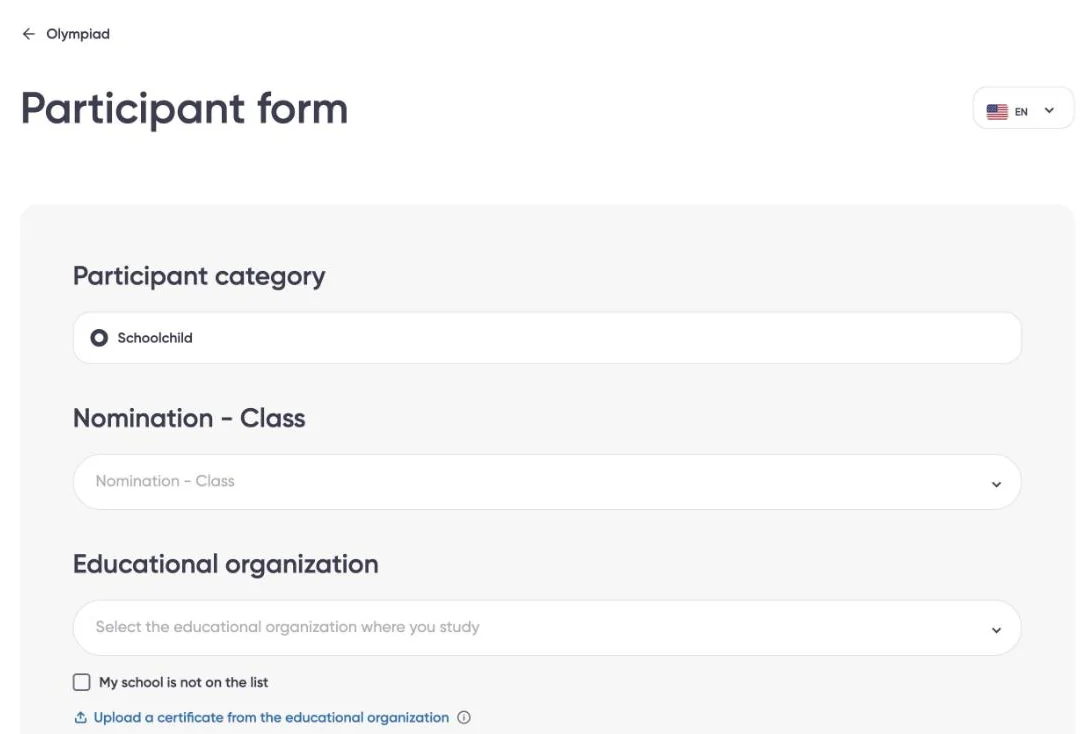 123
- 1Participant category “Participant category”: the Bachelor's application has one option, “Schoolchild”, already selected. Leave it as it is. For the Master's category, see the Master's page. It is separate from the account role “Listener” (step 9), and choosing it does not confirm eligibility.
- 2“Nomination - Class”: open the list and pick the programme you came from; it is the only one listed.
- 3“Educational organization”: search for the school where you study now and select it. If it is not there, go to step 12.
The platform writes “Optional field” only under optional fields (the passport fields in step 14). Treat every other field as required and fill it in. Some fields only appear after an earlier choice; the next steps point them out.
School, certificate and test language
Bachelor'sTried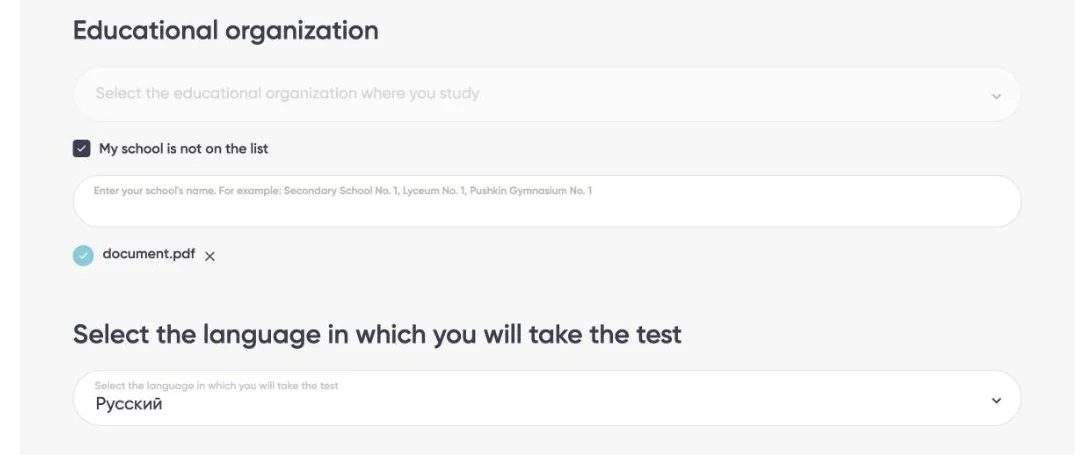 1234
- 1School not on the list? Tick “My school is not on the list”.
- 2A new field appears: type your school's official name in Latin letters, with its city. Example: Al-Nour Secondary School, Alexandria.
- 3“Upload a certificate from the educational organization”: upload the school certificate (file one). The file name appears once uploaded; while only the blue text shows, the slot is empty.
- 4“Select the language in which you will take the test”: this programme offers a single option, “Русский” (Russian). Select it.
| Three languages not to mix up | Where you choose it |
|---|---|
| Platform interface language | The language button at the top (EN/RU). It does not affect your application. |
| Test language | This field. It is the language of the test instructions, not proof of your language level. |
| Language of study at university | Shown on the programme card (step 7); not chosen in this form. |
General information
Bachelor'sTriedCheck your details exactly as they appear in your passport. Name, date of birth, age, email and phone come pre-filled from your account; check them letter by letter against your passport and correct any mistake; there is no need to retype what is already right.
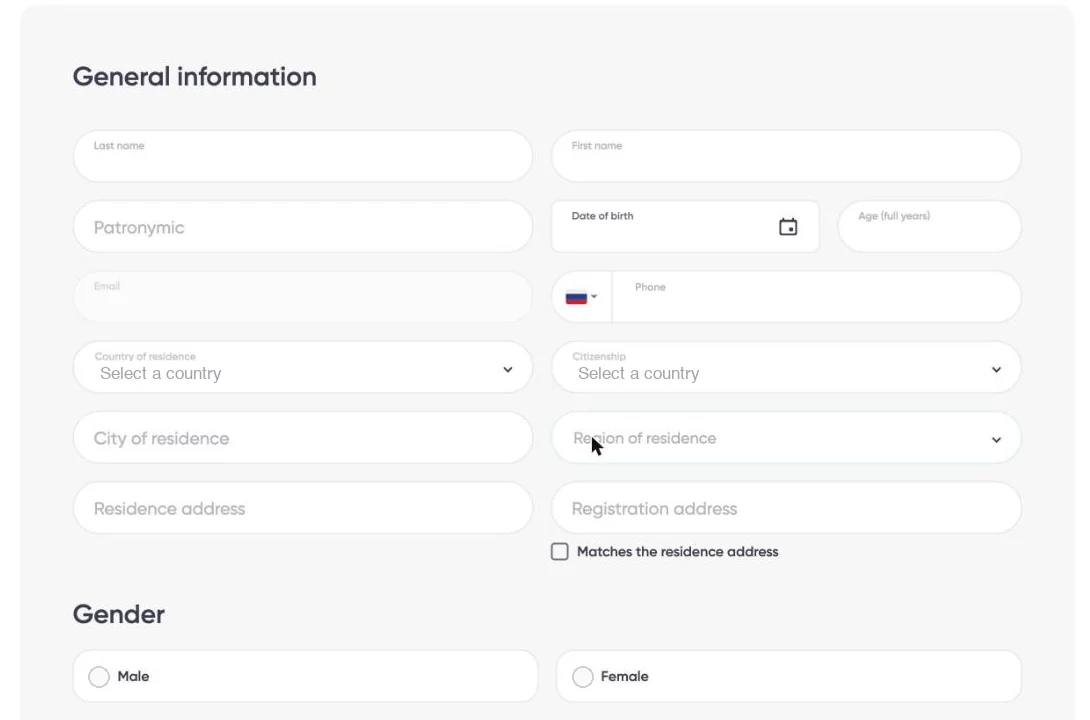 12345
- 1“Country of residence”: the country where you live now.
- 2“Citizenship”: the country that issued your passport. It can differ from where you live — an Egyptian studying in Saudi Arabia, for instance, lives in Saudi Arabia but holds Egyptian citizenship.
- 3“City of residence” appears once you choose a country of residence. Type the city and delete any space after the last letter; otherwise “Удалите лишние пробелы” (remove extra spaces) appears and the form will not send.
- 4“Region of residence”: choose your region within your country of residence. The fields and lists shown here follow the country you picked in item 1 and can differ from country to country; if the list appears in Russian, search by the Russian name.
- 5“Residence address” is where you live; “Registration address” is your officially registered address. If they are the same, tick “Matches the residence address”.
Below these is “Gender”: choose one.
Contact service and identity document
Bachelor'sTried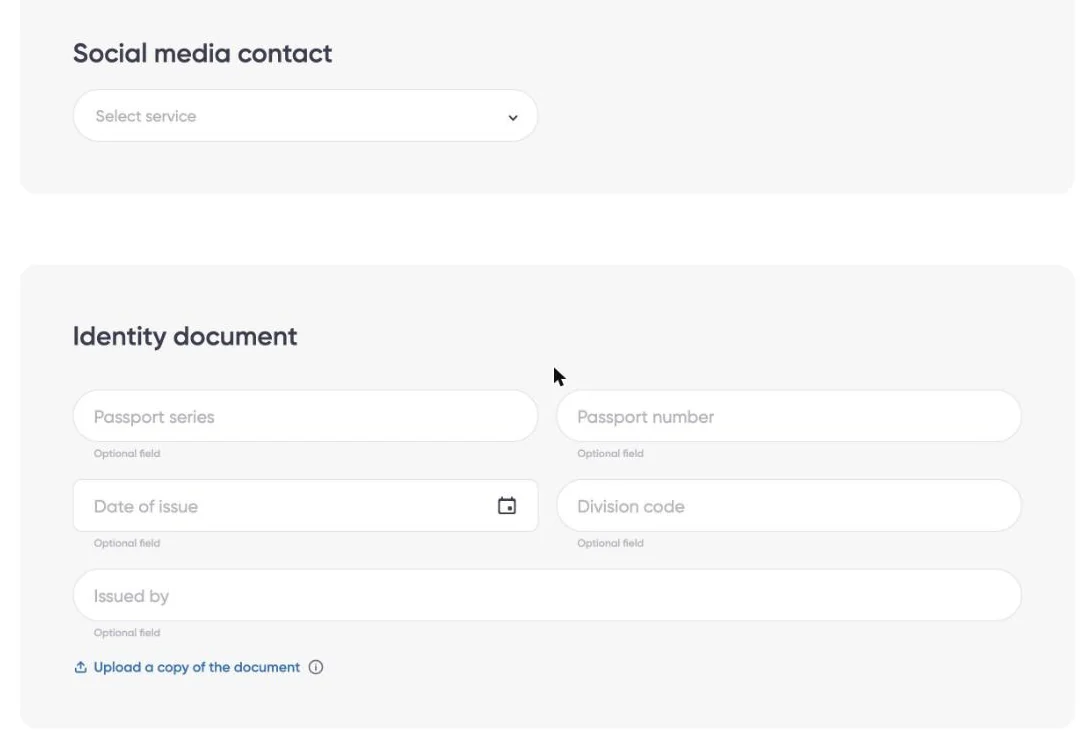 123
- 1“Social media contact”: pick an app you actually use from “Select service”, and a field appears for your ID on it (username, or the number linked to the account). The field is not marked “Optional field”, so fill it in with a real contact you check — never a made-up one.
- 2The passport fields under “Identity document” are optional (each says “Optional field”). Leave blank any field that does not apply: “Passport series” and “Division code” belong to Russian passports; if your passport has nothing matching them, leave them empty.
- 3“Upload a copy of the document”: upload your passport copy (file two). This slot is separate from the optional fields — do not leave it empty.
The signed consent, and the “Паспорт” box
Bachelor'sTried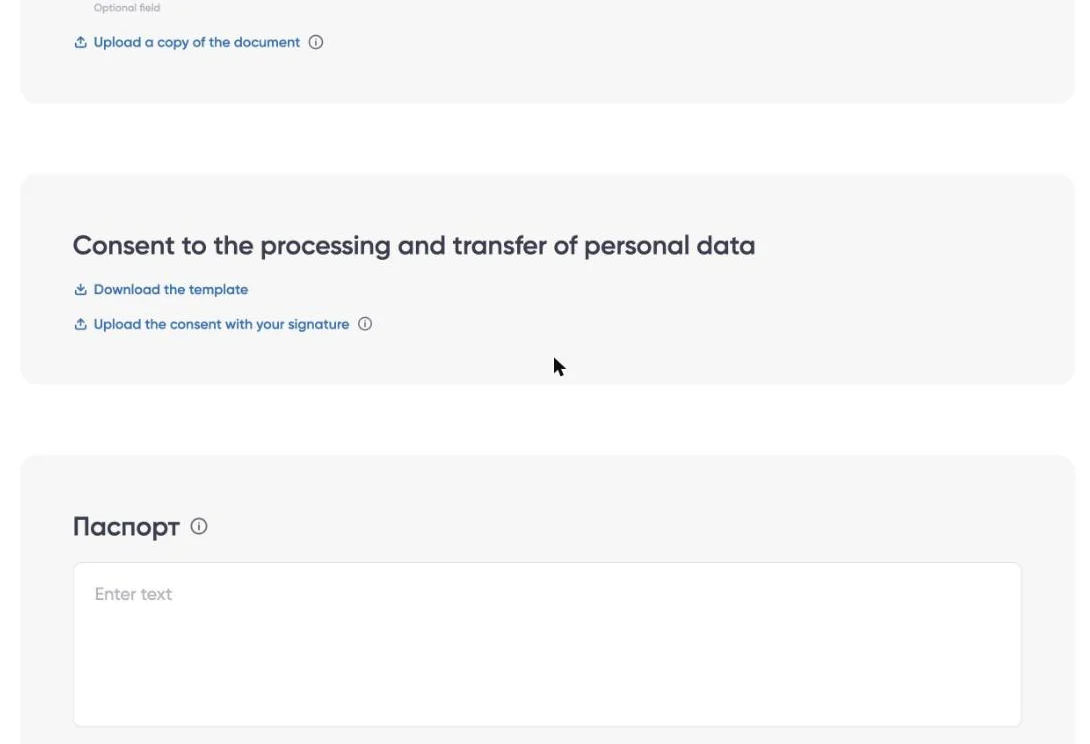 123
- 1“Download the template” downloads the consent form in the interface language.
- 2“Upload the consent with your signature”: fill in the form, sign it and upload it (file three).
- 3The last “Паспорт” box: its hint says it is for holders of a Russian passport. Leave it empty if you do not have one; your own passport copy went in at step 14.
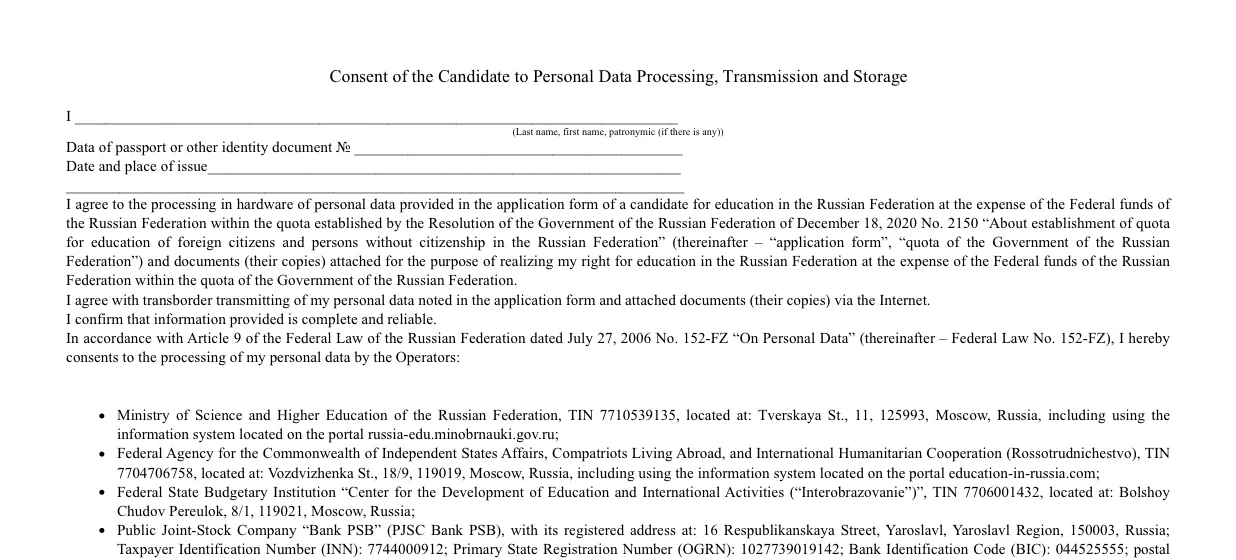
The English template has two pages. You fill in your full name as in your passport, the passport number, its date and place of issue, and at the end the date, your signature and your name with initials (for example A. M. HASSAN). The Russian version asks for the issuing authority instead of the place. Combine both pages into one pdf.
Check your attachments before sending
Bachelor'sTried- Files
- All three slots hold a file: certificate (12), passport (14) and consent (15). An empty slot still shows the blue “Upload…” text with no file name.
- Details
- Name and date of birth match your passport, citizenship and country of residence are right, and the registration address is filled in or ticked as matching your residence.
- Spaces
- No “Удалите лишние пробелы” message under any field. If one appears, delete only the space after the last letter.
The “Send” button and confirmation
Bachelor'sTried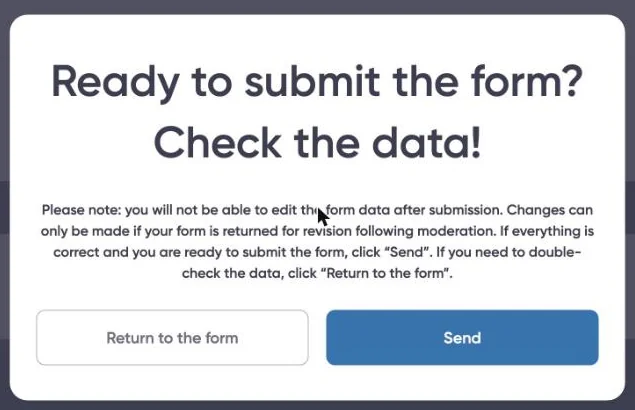 12
- 1“Ready to submit the form? Check the data!”: no edits after sending, unless the form is returned to you for corrections after review.
- 2“Send” sends the application; “Return to the form” takes you back to check it.
The thank-you message
Bachelor'sTried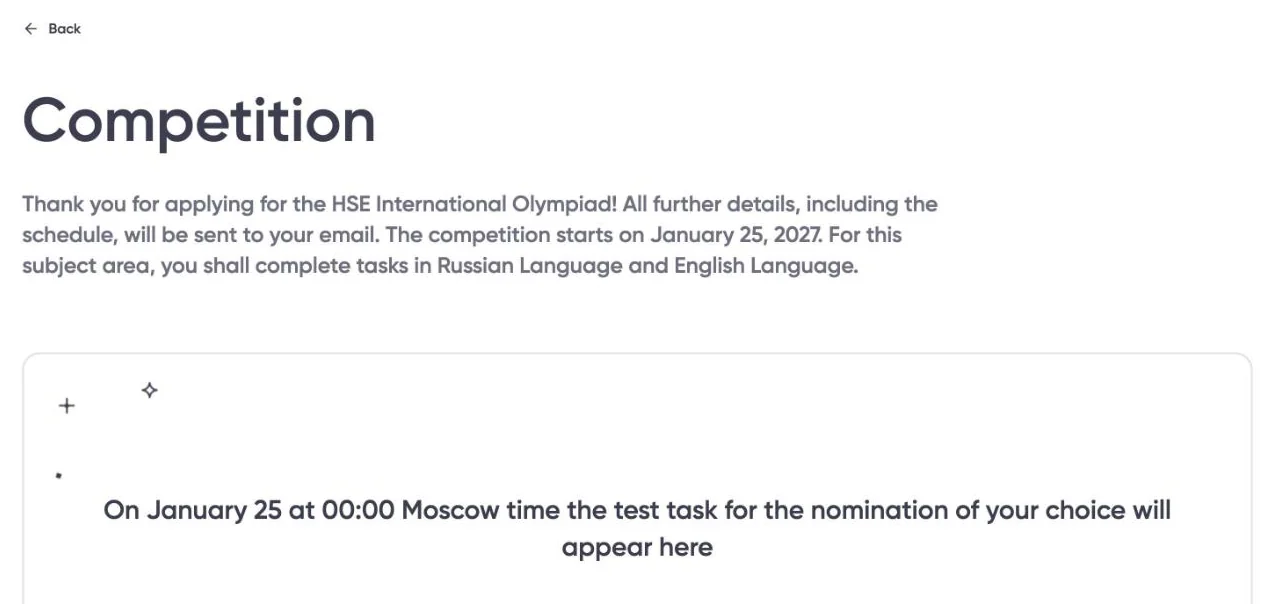 12
- 1“Thank you for applying for the HSE International Olympiad!”: your application has arrived. All further information, including the schedule, comes to your email.
- 2After this step, the details of your application's next task appear here. For this programme we saw: “On January 25 at 00:00 Moscow time the test task… will appear here”, i.e. 25 January 2027 (UTC+3). The wording and date can differ by programme, so go by what your own page shows.
- Done when
- you see this message. Keep a screenshot of it. Remember: a received application does not mean admission or winning.
Follow your application in “My Olympiad”
Bachelor'sTried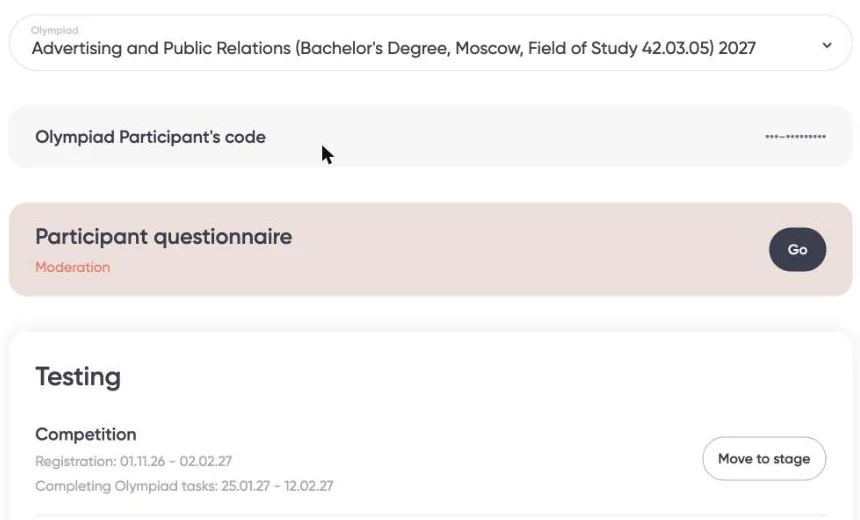 123
- 1The “Olympiad” list: each programme you applied to has its own application; switch between them here.
- 2“Participant questionnaire — Moderation”: the form is under review and cannot be edited for now.
- 3“Competition”: registration until 2 February 2027; test tasks from 25 January to 12 February 2027. “Move to stage” takes you into the test once it opens.
- Open your account and follow your application
- sodrujestvo.org · My Olympiad
- If the status changes
- If the form is returned to you for corrections, fix what is asked and send it again before registration closes.
What to do after sending
Both tracksOfficial source| When | What to do | Badge |
|---|---|---|
| Weekly until 2 February 2027 | Open “My Olympiad” and check the form's status; check your inbox and spam folder. Watch for any message asking for a correction or a document. | Tried |
| From 1 November 2026 | Submit the admission application itself at admissions.hse.ru. HSE lists it as a step separate from olympiad registration, and later asks you to report your result to the moderator under “Моя заявка”. | Official source |
| 1 December 2026 – 12 February 2027 | Master's Portfolio competition: upload your portfolio and watch for any interview or test your programme may hold. | Official source |
| Before 25 January 2027 | Go through the demo versions and past years' tasks, as HSE recommends. | Official source |
| 25 January – 12 February 2027 | Bachelor's The test: it appears in your account on 25 January 2027 at 00:00 Moscow time. | Official source |
| 15 – 18 February 2027 | Results announced. | Official source |
| 19 February – 23 March 2027 | Winners and prize-winners submit their documents. | Official source |
| March 2027 | Applications for free (quota) study close. | Official source |
HSE gives no date for when the form review ends; follow it in your account and inbox as in the first row.
Final checklist
- You have sent a form for each programme you want, and seen the thank-you message for each.
- Bachelor's: certificate, passport and consent uploaded. Master's: portfolio uploaded as your programme's page requires.
- You have submitted your admission application at admissions.hse.ru.
- You have noted the test date, and added the platform's address to your contacts so its emails do not land in spam.
Help and links
- Enquiries (Moscow): [email protected] · +7 (495) 531 00 59
- Conditions and admission steps: admissions.hse.ru/olymp
- Olympiad page on the platform: sodrujestvo.org/en/olympiads/olimpiada-dlya-inostrannyh-shkolnikov-niu-vshe
- Olympiad page on ATHAR: athar.ac/en/opportunities/hse-international-olympiad
I put this guide together so the steps are laid out clearly in front of you and your preparation gets the best possible chance. Take your time reading the conditions, prepare your documents carefully, and review your application before you send it. I wish you every success with your next step.
— Abdelrahman Yahya
Version history: 1.1 (5 November 2026): the buttons on ATHAR's HSE page now open the participation platform for each track, so the step 4 screenshot and its explanation were updated. 1.0 (5 November 2026): first release.
All sources read on 5 November 2026.