

Registering for the Gazprom Industry Olympiad for School Students
Foreign-student track: Informatics and Computer Science
From the olympiad page on Athar to the official registration platform, through the qualifying stage and the final, to the quota file after winning. Each step has a badge showing whether we checked it or took it from an official source.
Interfaces and dates can change; check the official sources before each step.
Contents
- Before you register: checklistp. 3
- Journey mapp. 4
- Part 1 — on Athar (steps 1–5)p. 5
- Part 2 — the olympiad platform (steps 6–10)p. 10
- Part 3 — the tests (steps 11–13)p. 15
- Part 4 — after the tests: results and the quota (step 14)p. 18
- Documents: for taking part and after winningp. 19
- Preparing for the foreign-student trackp. 20
- Extra practice from the general trackp. 21
- Official sources and review datesp. 22
How to read the badges
Checked we saw it ourselves on the public interface · Official source taken from the organiser's documents, not tried · Not tried not yet verified
Required you must do it · Optional you may skip it · Conditional depends on your situation or needs confirming
Before you register: checklist
- I am a current school student in a grade equivalent to Russian grades 8–11 (Regulation §1.5). Required
- My Russian or English is good enough to take part (§1.5). Required
- The organiser has confirmed in writing that my country is one the Regulation accepts; the list is not published. Conditional
- I have read the foreign-student schedule and know that the Foreign-student track: Informatics and Computer Science is the profile open to foreign students this season.
- I have decided on the test language, English or Russian; I will choose it on the application form.
- I have an email I check, and my passport, so I can enter its details in Russian or Latin letters exactly as written (Procedure §3.3). Required
- I have read the personal-data consent text on the documents page.
- If I am under 18: I will need a parent's consent to data processing at an in-person final (Procedure §5.5.6–5.5.7). Conditional
- I will register before 15 January 2027 and leave enough time to sit the qualifying stage before that same date.
Journey map: from Athar to taking part
This guide follows the foreign-student track in informatics, the only profile open to foreign students in the 2026/27 season. Badges show what we checked and what comes from an official source. Creating an account alone does not complete your participation.
- Part 1 — on Athar
- 1Find the opportunityFrom the home page, or by searching the opportunities index.Checked
- 2Read the eligibilityCountry condition (§1.5), grades 8–11, registering vs the quota right.Checked
- 3The olympiad page and its buttonsThe register button, choosing a profile, and the foreign-student schedule.Checked
- 4Profiles and tracksSix general-track profiles; informatics only for foreign students.Checked
- 5The informatics cardDates, the final, and the official sources.Checked
- Part 2 — on the olympiad platform
- 6Create the accountEmail, password and consents.Checked
- 7–10Confirm, sign in, apply and submitEmail confirmation, then citizenship and olympiad language (English or Russian), then the fields and declaration, then "Apply".Checked
- Part 3 — the tests
- 11–12The first round20 questions, 100 points, in English, 120 minutes, once only, by 15 January 2027. Starting it is a real attempt.Checked (the tab)
- 13The final1 February–30 March 2027, in person under the Regulation; date TBA.Official source
- Part 4 — after the tests
- 14Results and the quota fileOlympiad results; quota file to LETI by 30 March; quota places in April 2027.Official source
Find the opportunity
Checked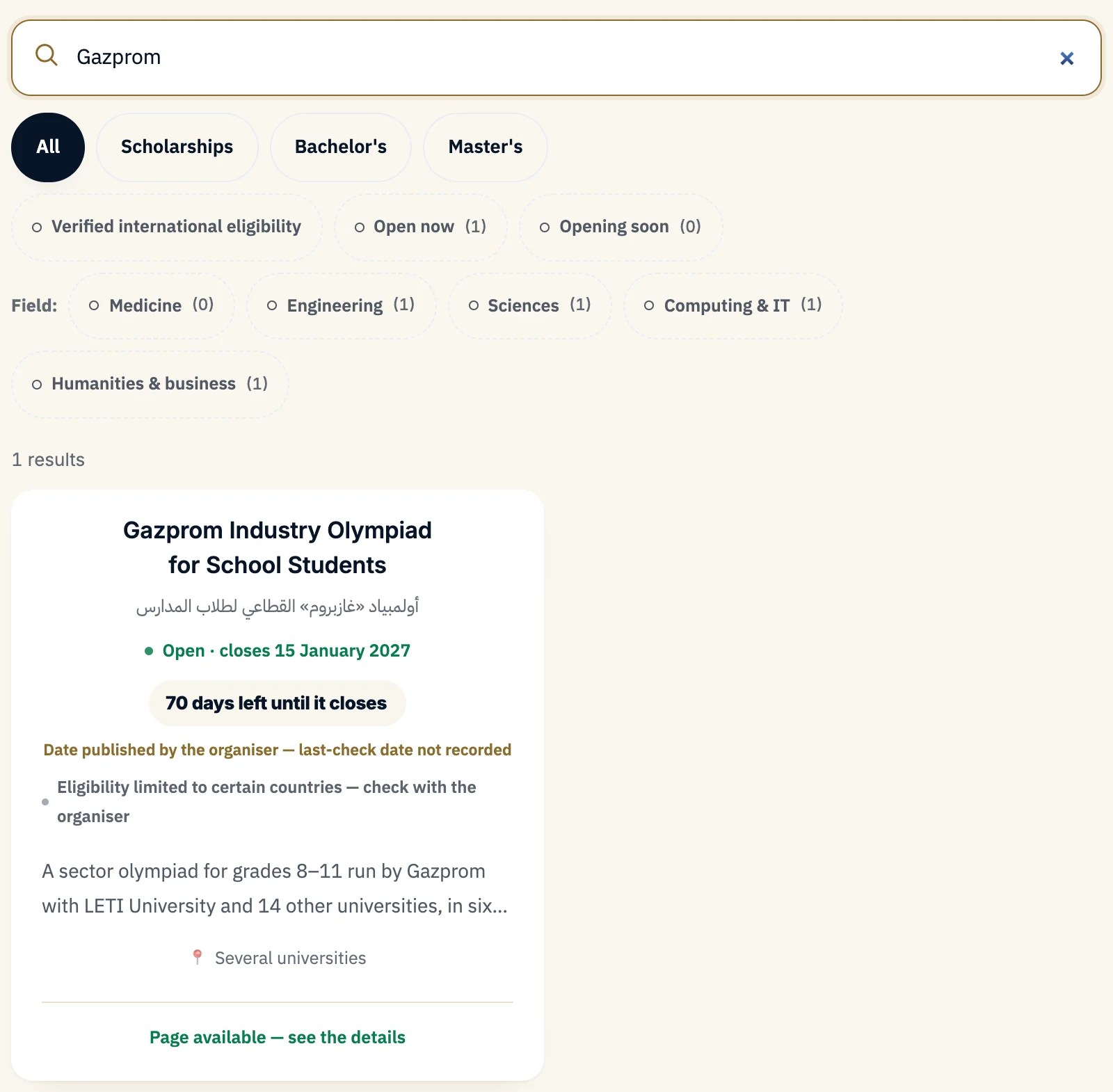 12
- 1In the opportunities index, type "Gazprom" in the search box.
- 2One result appears: "Gazprom Industry Olympiad for School Students". Open it. It is also on the home page under "Open now".
Direct link: athar.ac/en/opportunities/gazprom-school-olympiad
Read the eligibility before anything else
CheckedForeign-student track: Informatics and Computer Science. This is the only profile open to foreign students in the 2026/27 season.
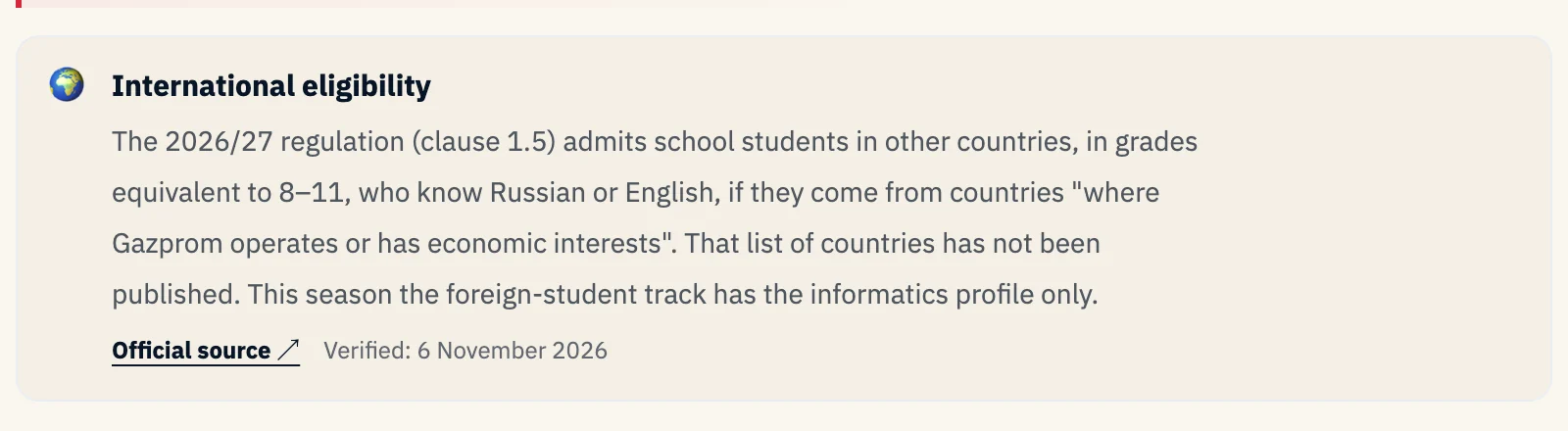 1
- 1International-student eligibility as set out in the Regulation (clause 1.5).
| Condition | Detail | Type |
|---|---|---|
| Grade | A current school student in a grade equivalent to Russian grades 8–11 | Required |
| Language | Russian or English good enough to take part | Required |
| Country | From a country "where Gazprom operates or has economic interests". No list of these countries is published; confirm with the organiser in writing | Conditional |
| School certificate from 2021 or later | A condition of the quota file after winning, not of registering for the olympiad | After winning |
In 2025/26, LETI's foreign-track page also accepted students who received their school certificate from 2021 on. The 2026/27 Regulation mentions students in final grades only; if you have already graduated, check with the organiser before registering.
Deadline: registration and the qualifying stage close on 15 January 2027, one attempt per profile.
- Step done
- When you have confirmed you are a current school student in the required grades, and the organiser has not ruled out your country.
The olympiad page on Athar
Checked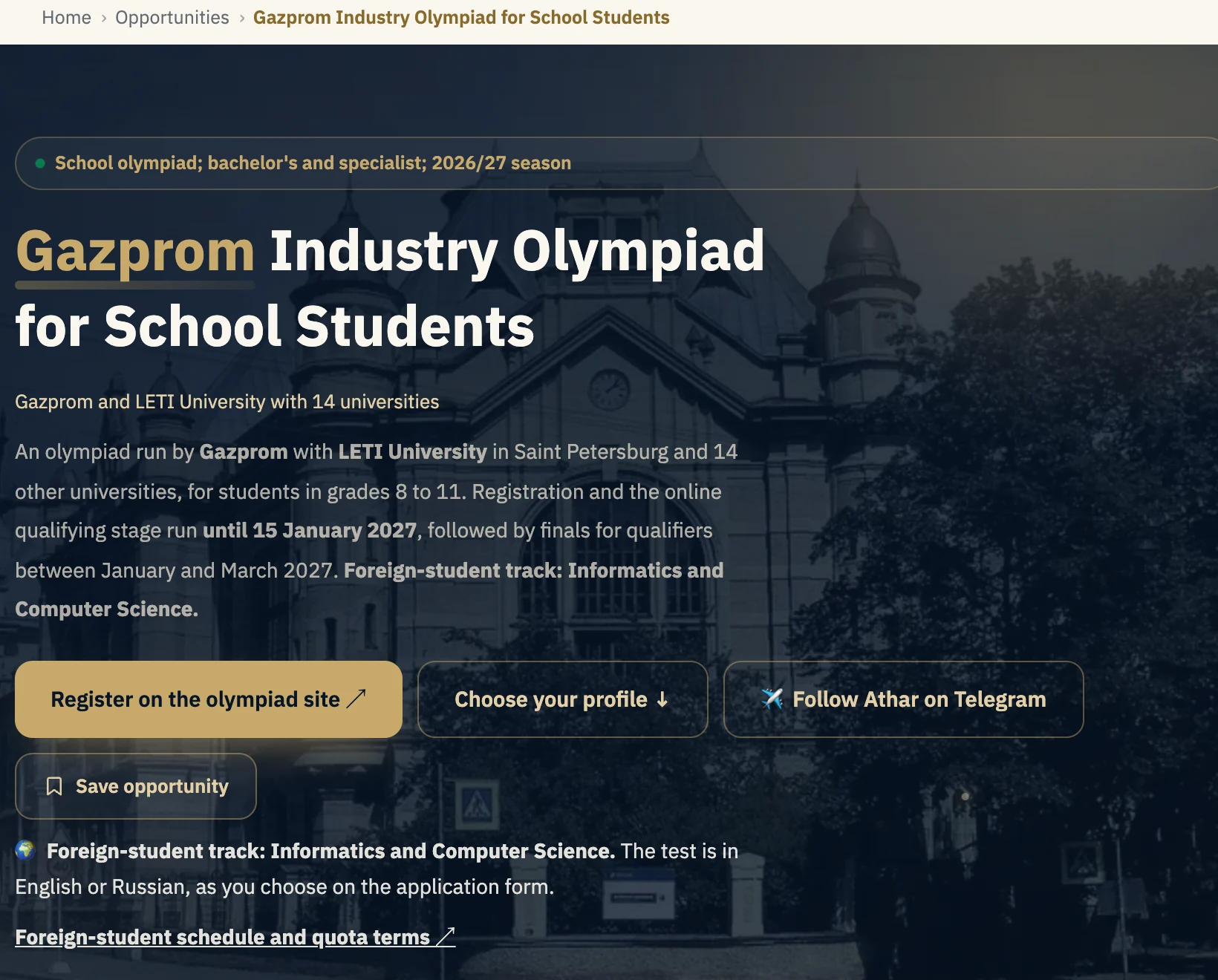 1234
- 1"Register on the olympiad site" opens the account page on the official platform (step 6).
- 2"Choose your profile" takes you to the six profile cards on the same page (step 5).
- 3Below the buttons: Foreign-student track: Informatics and Computer Science, and the test is in English or Russian, as you choose on the application form.
- 4"Foreign-student schedule and quota terms" opens the organiser's page for foreign students. Read it before you register.
The date that matters now: registration and the qualifying stage run from 10 October 2026 to 15 January 2027, one attempt per profile.
- Step done
- When you have opened the foreign-student schedule and confirmed that informatics is the profile open to you.
Profiles and tracks: which one is yours?
Checked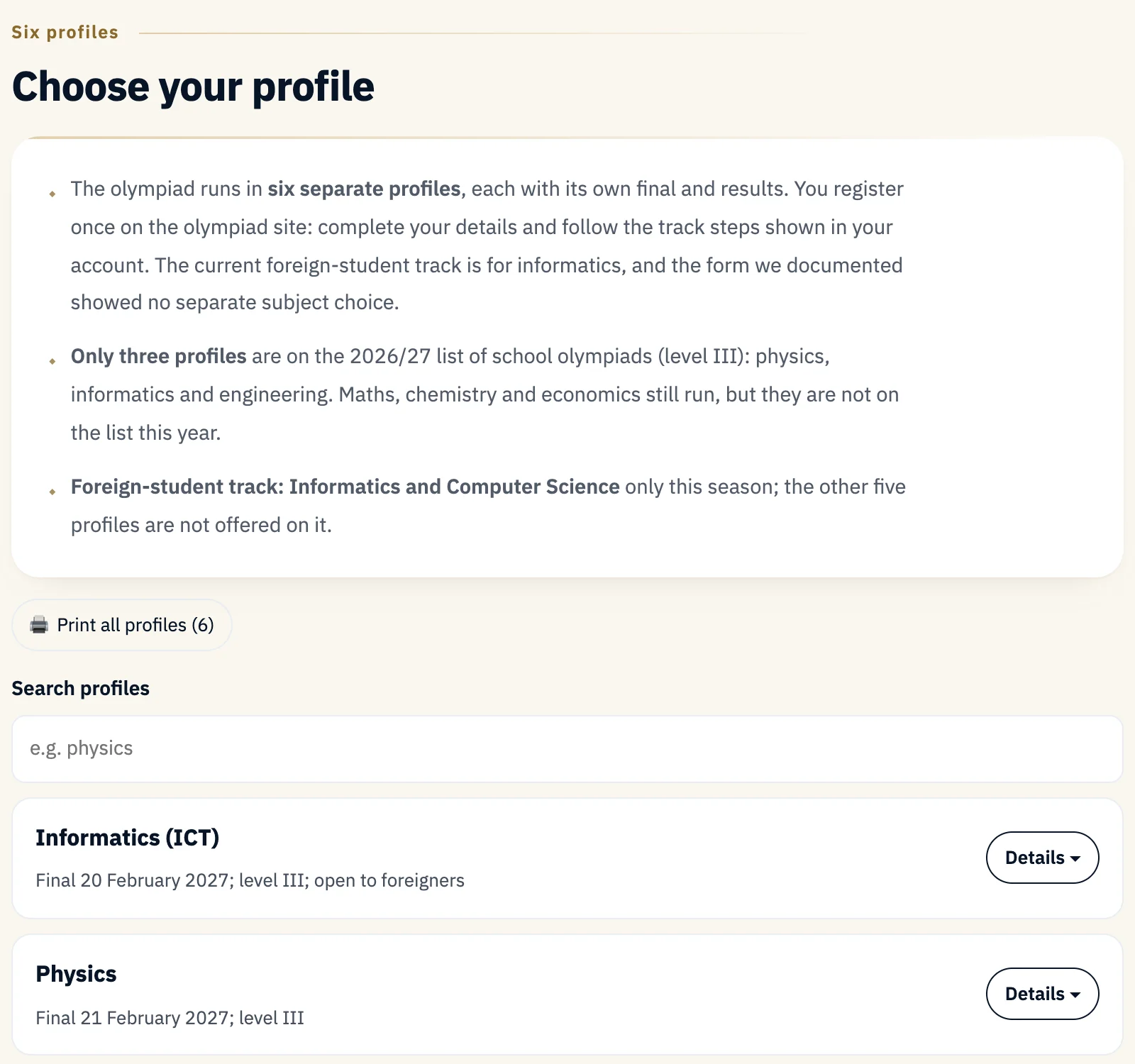 12
- 1The profiles summary: six separate profiles, one registration; Foreign-student track: Informatics and Computer Science only.
- 2The informatics card: the only profile open to foreign students this season (step 5).
| Profile | General track | Foreign track 2026/27 | On the 2026/27 list |
|---|---|---|---|
| Informatics | Yes | Yes | Yes (level III) |
| Physics | Yes | No | Yes (level III) |
| Engineering | Yes | No | Yes (level III) |
| Maths · Chemistry · Economics | Yes | No | No |
The quota right on the foreign-student page goes with winning or placing on the foreign-student track, which is informatics this season. Source: foreign-student schedule.
The informatics card
Checked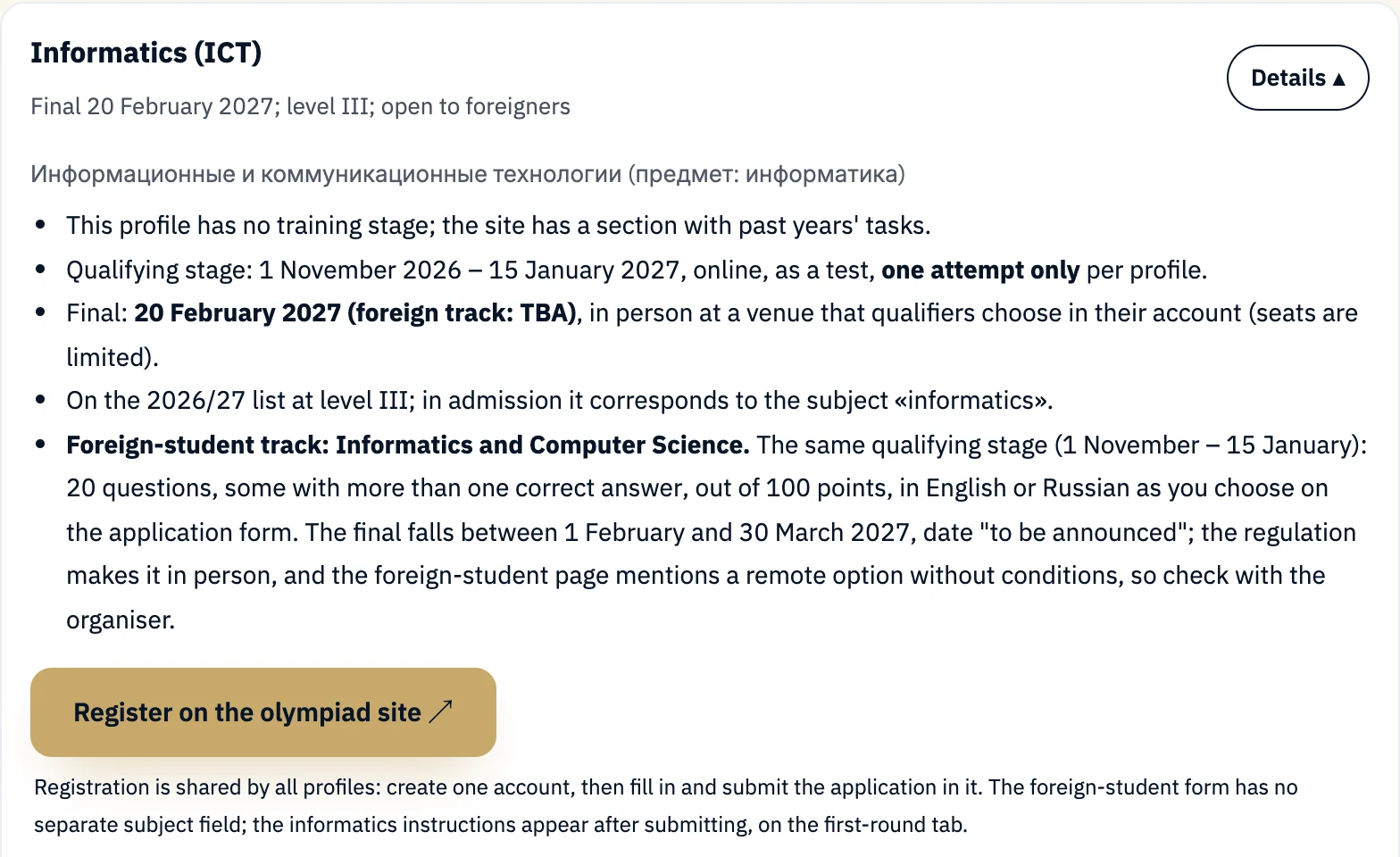 123
- 1Foreign-student track: Informatics and Computer Science. The qualifying stage runs from 1 November to 15 January: 20 questions, some with more than one correct answer, out of 100 points, in English or Russian. The final falls between 1 February and 30 March 2027, date "to be announced". Final format: see step 13
- 2The register button is the same on every card.
- 3The registration note: one account, then fill in and submit the application in it. The foreign-student form has no separate subject field.
The general track (for students in Russia) has six profiles, and its informatics final is on 20 February 2027 in person. Don't mix up the two schedules.
The account page
Checked · 6 Nov 2026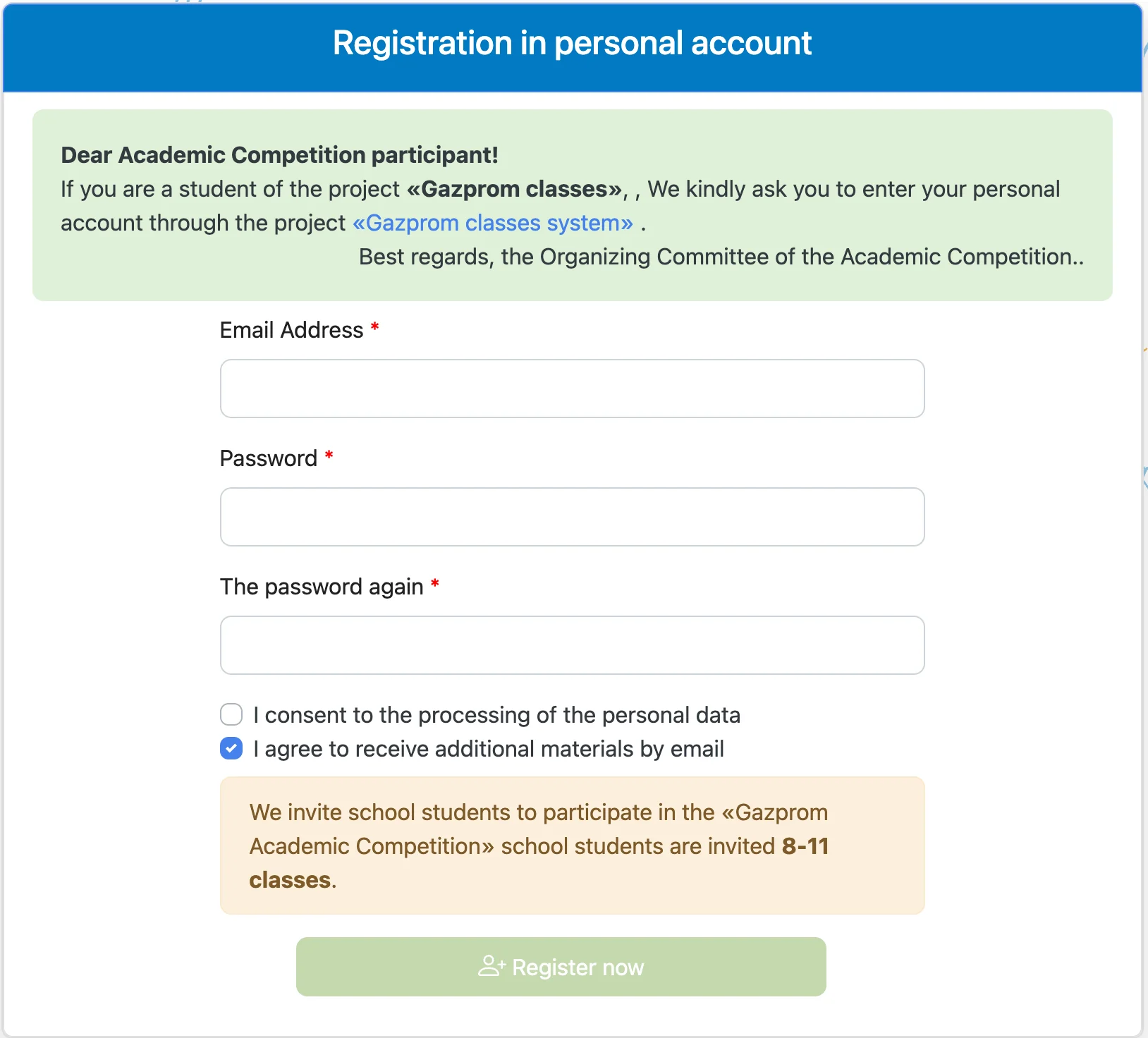 12345
- 1A note for "Gazprom classes" students only: they sign in through their own system. Probably not you
- 2Email, then the password twice. Required Use an email you check; your sign-in details go there.
- 3Consent to the processing of personal data. Required The button stays disabled without it. Read the consent text first (on the documents page).
- 4Agree to receive extra materials by email. Optional It comes ticked by default; untick it if you don't want emails.
- 5"Register now": press it once your details are checked; it creates your one olympiad account.
The platform has English and Russian interfaces (the flag button at the top); the screenshots in this guide use the English one.
Confirm your email and sign in
Checked · 6 Nov 2026 1
- 1After "Register now" an "Email confirmation" page appears: you cannot sign in until you confirm your email, and a message with a special link has been sent to it. Required
- Open the message and click the link. If you can't find it, check your spam folder.
- After confirming, sign in with the "Login" button using your email and password. Your personal account opens on the "Apply" tab.
- The account has five tabs: Apply, First (elimination) round, Second (final) round, Results, and Documents.
The application: citizenship and olympiad language
Checked · 6 Nov 2026 12
- 1"Citizenship": choose your own citizenship from the list. Required "Egypt" in the screenshot is an example from the account we documented, not a required choice.
- 2"Choose your language" (the olympiad language): two options only, English or Russian. Required This is the language of the test, not of university study.
Once citizenship and language are chosen, the remaining fields appear (step 9). The form we documented, with Egyptian citizenship (we have not checked the options for other citizenships), showed no separate field for choosing the subject, or for school and grade; after submitting, the "First (elimination) round" tab shows the informatics instructions.
The remaining fields, the declaration, and submitting
Checked · 6 Nov 2026| Field | What to enter | Type |
|---|---|---|
| Surname · Name | As in your passport, in Latin letters | Required |
| Filled in from your account | — | |
| Sex | From the list | Required |
| Date of Birth | DD-MM-YYYY | Required |
| Year of graduation from the educational institution | The year you finish (or finished) school, as in your education document. The interface says no more than that | Required |
| Declaration | That you know the details must match your passport and education document exactly, and that incorrect information is grounds for disqualification | Required to submit |
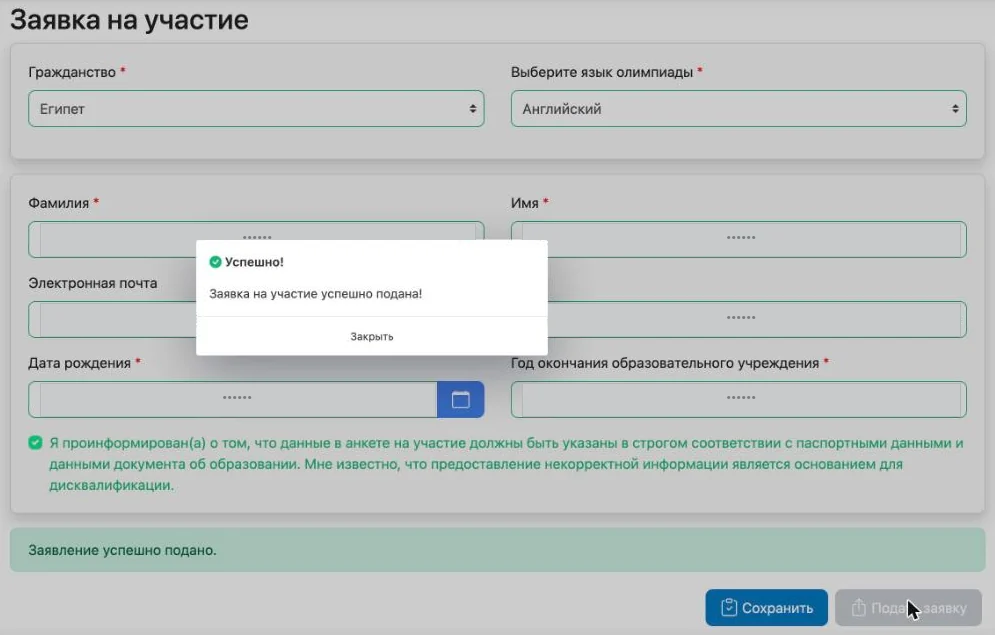 123
- 1After "Apply" a success pop-up appears. In English: "Success! Your participation application has been submitted successfully!" Captured before switching the interface to English
- 2A green bar under the form: "Application successfully submitted."
- 3The submit button becomes disabled.
The two buttons: "Save" only stores your details; "Apply" submits the application. In the English interface both buttons sit below the form, labelled "Save" and "Apply", and both are disabled after submitting. Submitting does not start any test, and it does not mean the organiser has accepted your application or confirmed your eligibility.
How do you know it was submitted?
Checked · 6 Nov 2026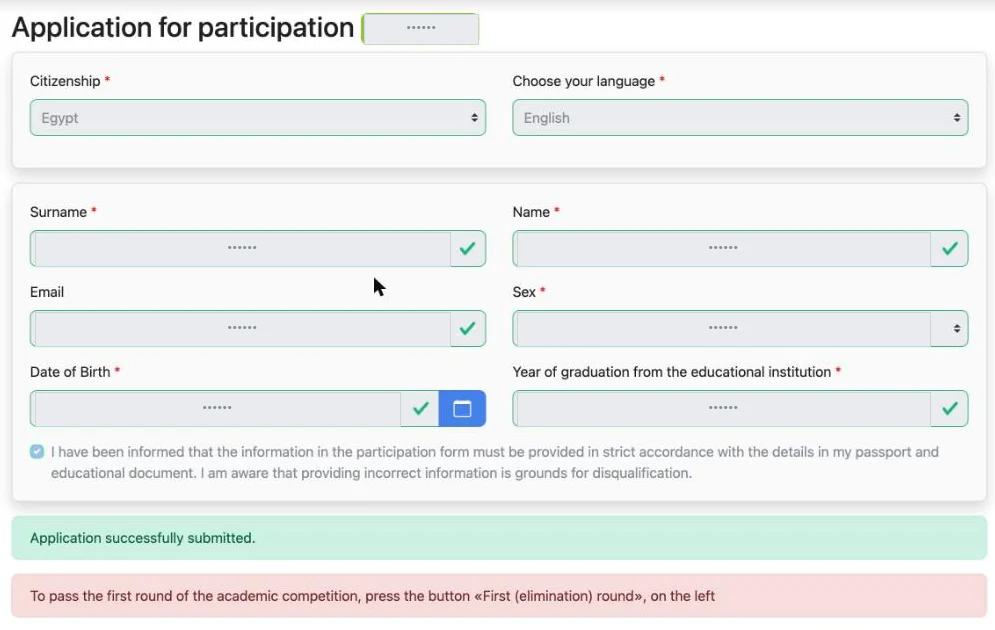 1234
- 1Your application number appears next to the form title, and the fields are locked.
- 2The declaration stays as you confirmed it.
- 3The green bar "Application successfully submitted."
- 4The red bar points to the next step: to take the first round, press "First (elimination) round" on the left.
- Step done
- When you see the application number and the green bar. Keep your application number to yourself; don't post it.
The first-round tab
Checked · 6 Nov 2026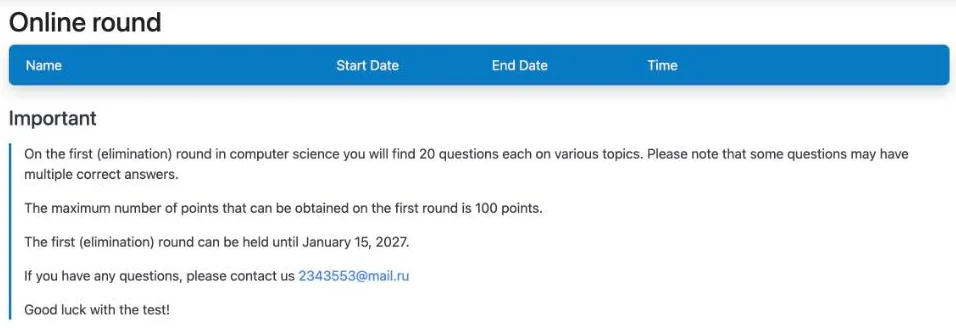 12
- 1Under "First (elimination) round" in the left menu: the test table (name, start, end, time allowed). It was empty when we looked; the test appears here when the organiser opens it.
- 2The informatics instructions for foreign students: 20 questions on various topics, some with more than one correct answer, a maximum of 100 points, open until 15 January 2027. For questions, this tab shows the address [email protected].
When the test appears in the table
Seen · 6 Nov 2026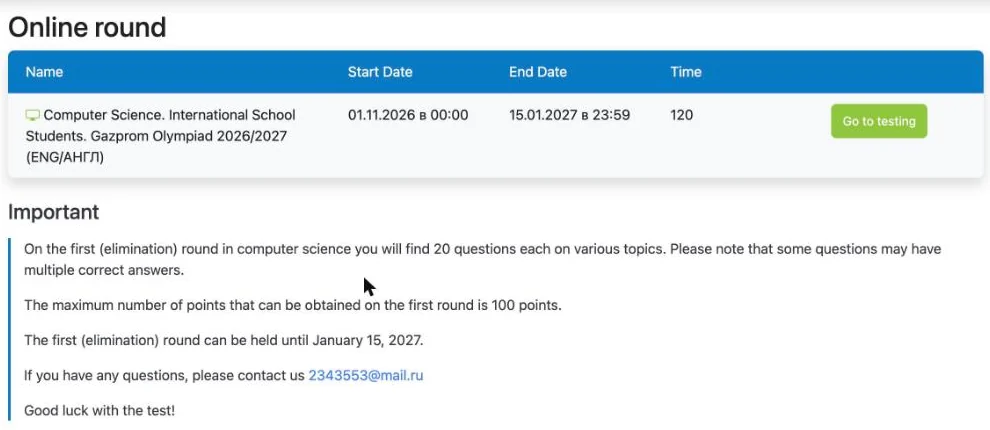 123
- 1The test name: "Computer Science. International School Students. Gazprom Olympiad 2026/2027 (ENG/АНГЛ)", the informatics test for international school students, in English for those who chose it. Open from 01.11.2026 at 00:00 to 15.01.2027 at 23:59.
- 2Time allowed: 120 minutes.
- 3"Go to testing". We did not press it.
First round on the foreign-student track: summary
- The test is available in English on the track we documented.
- 20 questions, some with more than one correct answer.
- A maximum of 100 points.
- Duration: 120 minutes.
- Deadline: 15 January 2027.
- Starting the test is a real attempt, not a way to preview the questions.
The final
Official source- Foreign-student track: between 1 February and 30 March 2027; the exact date is "to be announced" (foreign-student schedule).
- Current-season documents: the Regulation (§3.3, §3.9) makes the final in person at the organisers' venues, and the Procedure (§5.4) makes it in person for foreign students where venues exist in their country. The foreign-student schedule page also mentions taking part remotely with video proctoring, without conditions. Confirm with the organiser before arranging travel or relying on taking part remotely.
- Taking part is free; travel and accommodation are at your own cost (Regulation §3.1).
Historical instructions on the final tab
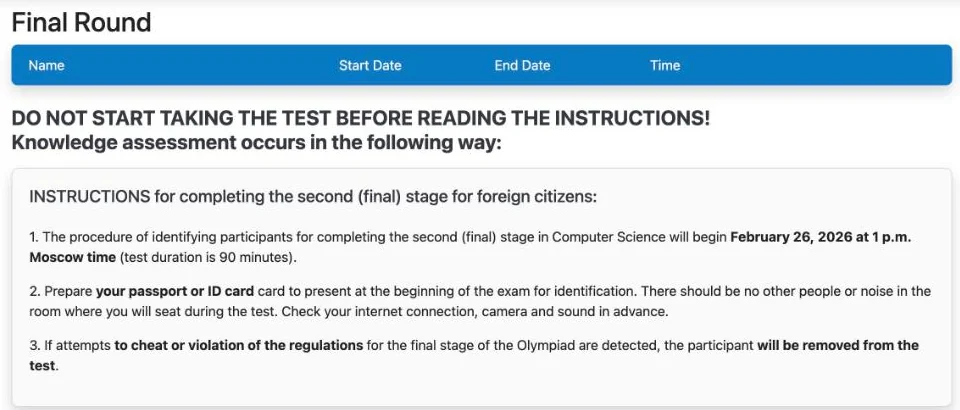 1
- 1The tab currently shows "instructions for the final stage for foreign citizens" dated 26 February 2026: a remote final of 90 minutes, with a passport identity check, a camera and microphone, and an empty room. These are last season's instructions, not a confirmation of how the 2027 final will run.
If your final is in person
- I have chosen a venue in my account before places run out (Procedure §5.5.1–5.5.2).
- I have printed my participant card, and I have my passport and a school certificate (§5.5.5, §5.5.8).
- I will arrive early; anyone more than 30 minutes late is not admitted (§5.5.3–5.5.4).
After the tests: results and the quota
Official sourceThese stages are as described on the 2026/27 foreign-student schedule page. Each date is tied to its event; where no date is published, we say so.
- Sitting the teststo 15 Jan · then 1 Feb–30 Mar 2027The qualifying stage, then the final for those who qualify.
- Olympiad winners and prize-winners announceddate not publishedResults of both stages are published on the olympiad site and in your account (Regulation §1.9; Procedure §5.3).
- Quota file sent to LETIby 30 March 2027For foreign winners and prize-winners, by email to the International Student Office: [email protected]. The documents are on the next page.
- Quota places announcedApril 2027This is the quota result, not the olympiad result. Winning gives the right to be considered within the Russian Government quota; it does not guarantee a place.
- University admissionafter the place is confirmedThe university sets the Russian level required; if needed, a preparatory language year is available within the quota.
Documents: for taking part and after winning
For taking part in the olympiad
| Document | When | Type |
|---|---|---|
| An email address and passport details in Russian or Latin letters | At registration (§3.3) | Required |
| Consent to data processing | At registration, and a signed form at an in-person final (§5.5.7) | Required |
| Parental consent | For under-18s at an in-person final (§5.5.6) | Conditional |
| Printed participant card, passport and school certificate | On the day of an in-person final (§5.5.5, §5.5.8) | Conditional |
After winning or placing: the quota file
| Document | Notes | Type |
|---|---|---|
| Passport | With a notarised Russian translation | Required |
| School certificate with grades | Issued in 2021 or later, with a notarised translation, and legalisation or apostille if needed | Required |
| Medical certificates | HIV, hepatitis and tuberculosis tests, a chest X-ray and a general health certificate, with notarised translations | Required |
| Application form and data consent | The quota candidate's form | Required |
The "Results" and "Documents" tabs in your account
 12
- 1"Documents".
- 2"The documents section is available only to winners of the final stage." The "Results" tab says results will be available later.
Source: 2026/27 foreign-student schedule and the 2026/27 Procedure. Sending the file has not been tried.
Preparing for the foreign-student track
This section is advice, not a condition of taking part.
What the foreign-student account shows for 2026/27
- You choose the test language on the application form: English or Russian.
- The informatics first round: 20 questions, some with more than one correct answer, a maximum of 100 points, until 15 January 2027.
- In the test table: "Computer Science … (ENG/АНГЛ)", with a duration of 120 minutes.
From the foreign-student account, viewed 6 November 2026. We did not open the test.
Earlier sources that point the same way
| Source | What it says | Season |
|---|---|---|
| LETI's foreign-track page | Languages: Russian and English | 2025/26 |
| Final instructions in the account | Remote foreign-student final, 90 minutes, dated 26 February 2026 | 2025/26 |
| A student from an earlier season | Both tests in English, multiple choice, about 40 questions in the second stage | earlier season |
A practical plan
- Review school informatics basics in the language you will choose for the test.
- Practise timed multiple-choice questions, including ones with more than one correct answer.
- Use the general-track materials on the next page to practise concepts, not the test format.
Extra practice from the general track
The organiser publishes these materials for the general track in Russia, in Russian. We list them for practising informatics concepts only; they do not describe the foreign-track test's format, duration or programming languages.
| Material | Season and track |
|---|---|
| 2026 tasks with answers (grades 8–9 and 10–11, two versions each) | 2025/26 · general track |
| 2018–2025 tasks with solutions, and preparation videos for the final | earlier seasons · general track |
| Instructions for the computer-based in-person final: 235 minutes on school.tpu.ru, in Python or C++ | 2025/26 · general-track in-person final |
| Diploma thresholds for informatics (out of 115 points) | 2025/26 · general track |
Topics in the 2026 tasks (for practice, not a full syllabus)
- Logic, truth tables and building circuits from logic gates.
- Number systems, data encoding, file sizes and transfer rates.
- Counting and probability, databases (normal forms) and spreadsheets.
- Writing programs that are marked by automatic tests.
Task topics and formats change from year to year, and practising them does not guarantee a result.
Official sources and review dates
| Source | Season | Last checked |
|---|---|---|
| Foreign-student schedule | 2026/27 | 6 November 2026 |
| Olympiad Regulation (Polozhenie) | 2026/27 | 6 November 2026 |
| Olympiad Procedure (Reglament) | 2026/27 | 6 November 2026 |
| Personal-data consent form | 2026/27 | 6 November 2026 |
| Account registration page | current | 6 November 2026 |
| Personal account (foreign track): application, first-round and final tabs | current; the final tab shows 2025/26 text | 6 November 2026 |
| Preparation page | earlier seasons · general track | 6 November 2026 |
| LETI's foreign-track page | 2025/26 | 6 November 2026 |
Contacts
- Olympiad technical support: [email protected]
- LETI International Student Office (quota questions): [email protected]